
Age Verification Gate (18+ / configurable). Age Verification Gate adds a configurable age-verification gate for goods subject to a minimum age (18+ or any value you set). Choose whether to gate the whole site, only flagged products and categories, or only at checkout; pick a simple yes/no confirmation or a real date-of-birth check; and remember the visitor's choice with a cookie. The blocking overlay is accessible and fully styleable. No coding, no theme edits. Note: a client-side gate is a diligence/UX measure, not a strong legal barrier.
Age Verification Gate adds a configurable age-verification gate for goods subject to a minimum age (18+ or any value you set). Choose whether to gate the whole site, only flagged products and categories, or only at checkout; pick a simple yes/no confirmation or a real date-of-birth check; and remember the visitor's choice with a cookie. The blocking overlay is accessible and fully styleable. No coding, no theme edits. Note: a client-side gate is a diligence/UX measure, not a strong legal barrier.
1. Installation
- In the back office go to Modules → Module Manager → Upload a module and select the module ZIP.
- Once installed, click Configure to open the settings.
.local, .test, localhost) are always allowed. When a new version is available it is shown right inside the module.2. Configuration: step by step
The Configure screen has two panels: the gate Settings and the Targeting manager. Set up the behaviour first, then (if you gate only specific items) flag the products and categories.
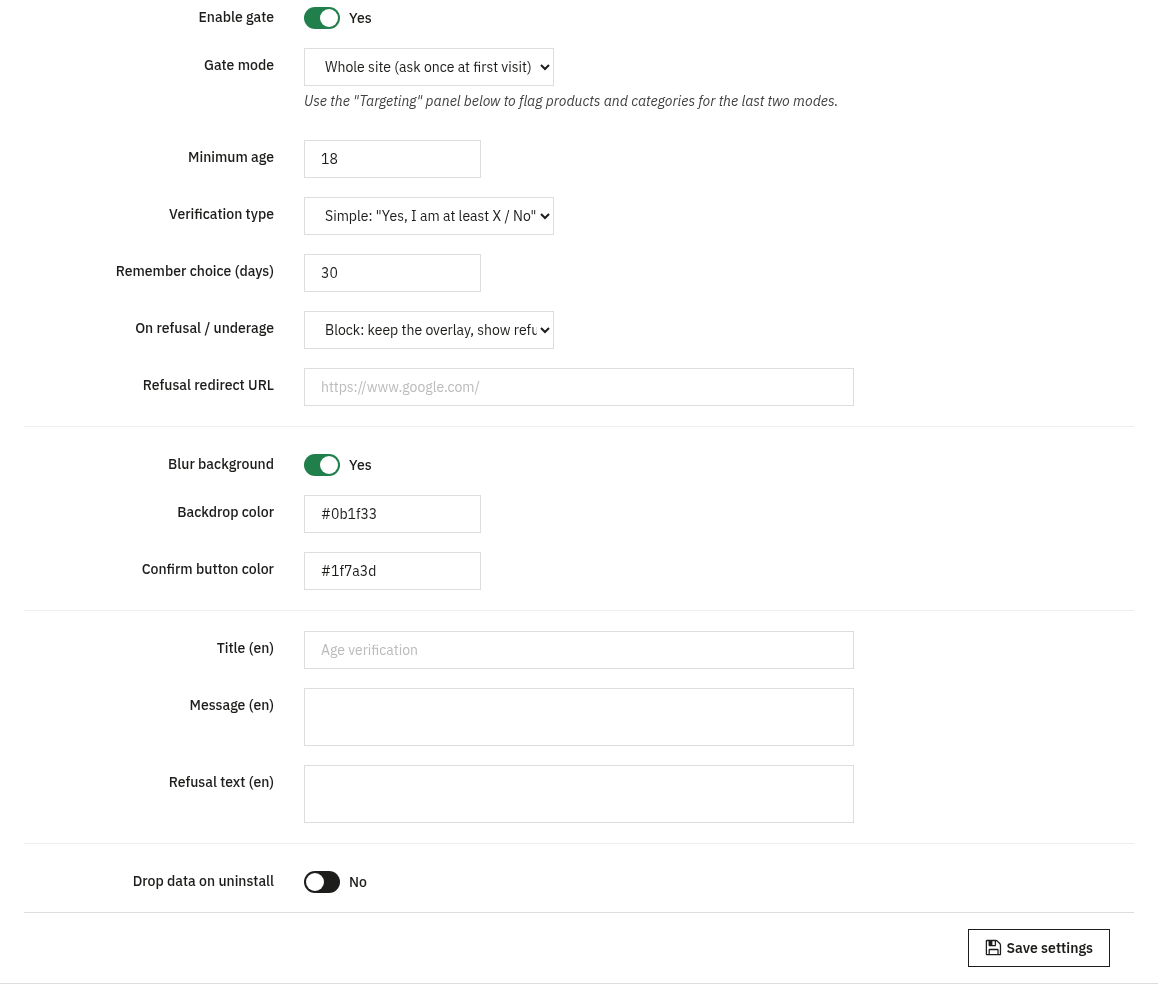
Age Verification - Settings core
Define when the gate appears, how the visitor is checked, what happens on refusal, and how the overlay looks. Texts are per language.
- Enable gate: the master on/off switch. Nothing is shown to visitors until this is on.
- Gate mode: Whole site (ask once at first visit), Only on flagged products/categories, or Only at cart/checkout when a flagged product is present.
- Minimum age: the required age (1 to 120), e.g. 18.
- Verification type: Simple: "Yes, I am at least X / No" or Date of birth (real age is computed).
- Remember choice (days): cookie duration (1 to 3650) so a confirmed visitor is not asked again.
- On refusal / underage: Block: keep the overlay, show refusal message, Message only (same as block), or Redirect to a URL.
- Refusal redirect URL: where to send a refused visitor when the action is Redirect (must start with
http(s)://or/). - Blur background, Backdrop color and Confirm button color: the overlay appearance (colors as
#rrggbb). - Title, Message and Refusal text: the wording shown in the overlay, editable per language.
- Drop data on uninstall: whether to remove the module's settings and targeting when you uninstall.
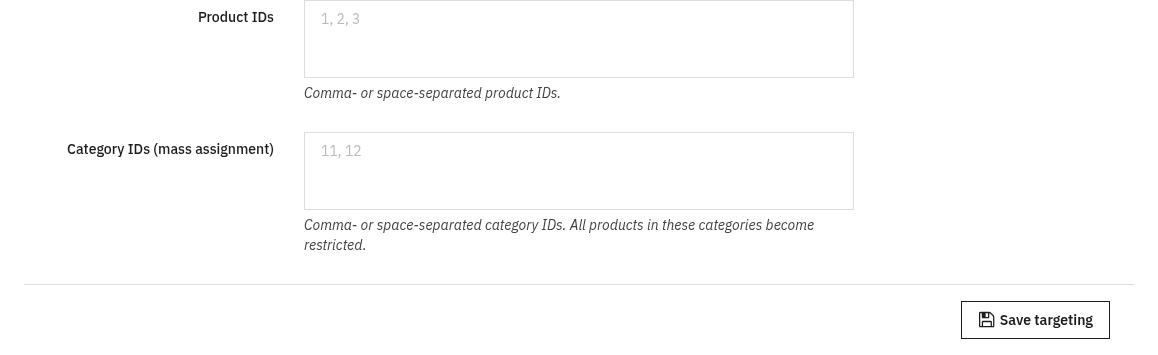
Age-restricted targeting flagged mode
Used when the gate mode is Only on flagged products/categories or Only at cart/checkout. Here you choose exactly which catalogue items are age-restricted. No core files are changed: flags are stored in the module's own table.
- Product IDs: comma- or space-separated product IDs to flag as restricted.
- Category IDs (mass assignment): comma- or space-separated category IDs; all products in these categories become restricted.
3. Check that it works
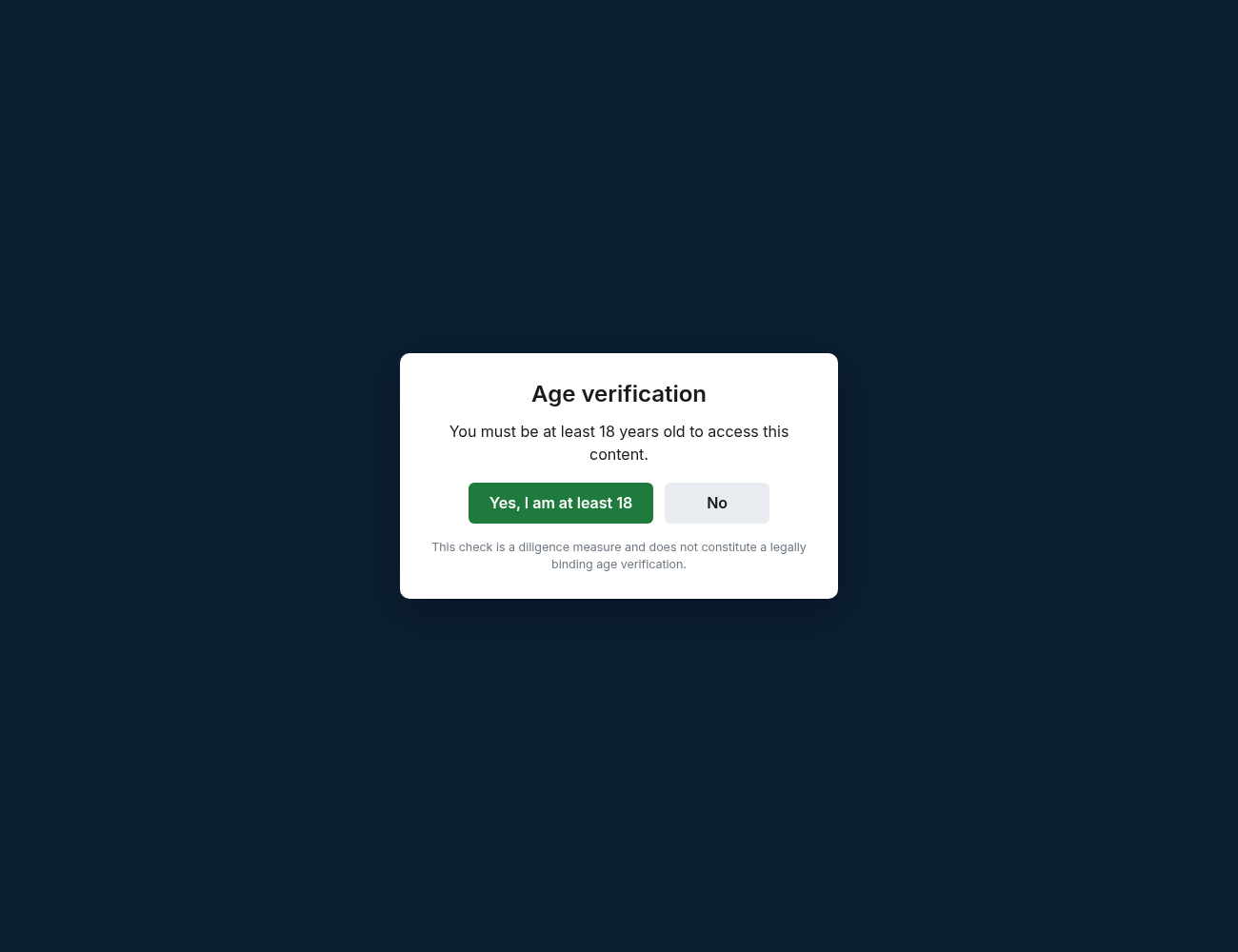
- Open a fresh / incognito session and visit a targeted page (or any page in Whole-site mode): the blocking overlay should appear over the content, as above.
- Pass the check (confirm you meet the minimum age) and browse on: within the Remember choice window you should not be asked again.
- In Whole-site mode, fail or refuse the check and confirm the configured refusal action (block message or redirect) takes effect.
- In flagged mode, visit a non-targeted page and confirm it is unaffected: no overlay should appear there.
4. FAQ
Is this a legal age-verification system?
No. A client-side gate is a diligence and UX measure to discourage underage access: it is not a strong legal barrier. Use it alongside, not instead of, any compliance requirements that apply to you.
Will it block search engines or hurt SEO?
The gate is a front-office overlay; your pages and their content remain available. Use flagged mode to limit it to the products and categories that actually need it.
Do I need to edit my theme?
No. The module works through standard hooks and is compatible with any theme; the overlay colors and texts are configured in Settings.
Why was a visitor asked again?
The choice is remembered with a cookie for the number of days you set. Clearing cookies, using a different browser, or an expired window will show the gate again.