
EU Withdrawal Button. EU Withdrawal Button adds the mandatory digital withdrawal function required by Directive 2023/2673: an always-visible button, a two-step confirmation, a durable receipt with a legal timestamp, a withdrawal register and a return slip PDF. From 19 June 2026 this function is mandatory for B2C distance contracts in the EU.
EU Withdrawal Button adds the mandatory digital withdrawal function required by Directive 2023/2673: an always-visible button, a two-step confirmation, a durable receipt with a legal timestamp, a withdrawal register and a return slip PDF. From 19 June 2026 this function is mandatory for B2C distance contracts in the EU.
1. Installation
- In the back office go to Modules → Module Manager → Upload a module and select the module ZIP.
- Once installed, click Configure to open the setup screen.
.local, .test, localhost) are always allowed. When a new version is available it is shown right inside the module.2. Configuration · step by step
The Configure screen is a full settings panel with a Save button. The module has two tabs: Withdrawal register and Settings.
Withdrawal register
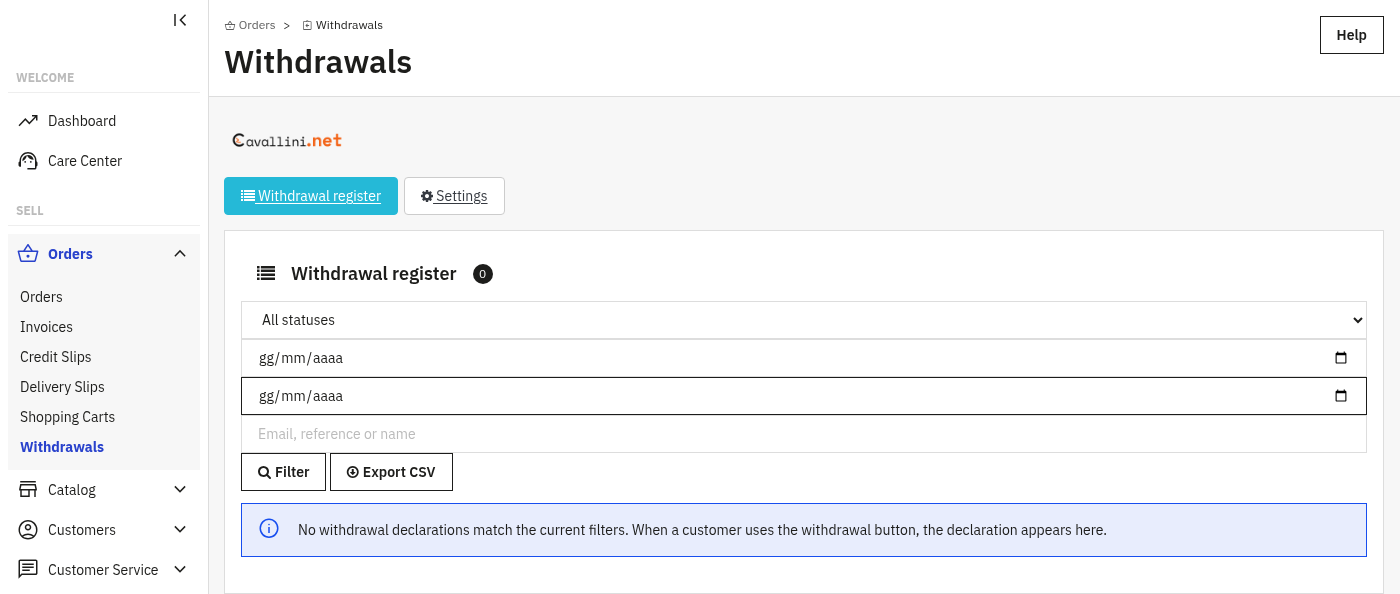
The default tab lists every declaration: status filter, date range, a search box (email, reference or name), a Filter button and an Export CSV button. Each declaration carries its audit trail and refund countdown. When no declaration matches the filters, or none exists yet, the panel simply says so: it fills in as soon as a customer uses the withdrawal button.
Settings
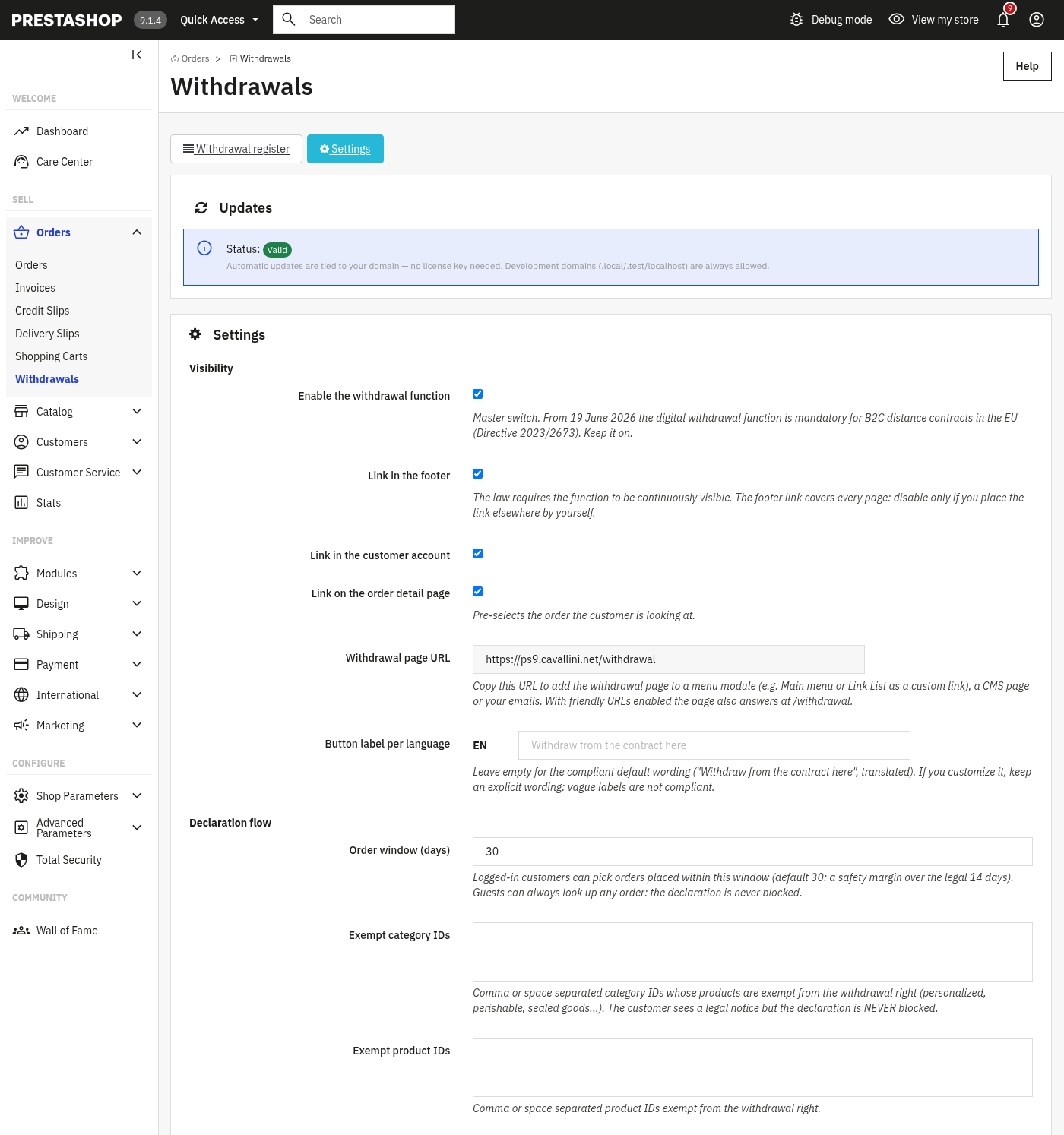
The Settings tab covers visibility of the button, the declaration flow, how the declaration plugs into your orders, the receipt and return slip, and data handling. Start with the Visibility and Declaration flow groups.
- Enable the withdrawal function: the master switch. From 19 June 2026 the digital withdrawal function is mandatory for B2C distance contracts in the EU; keep it on.
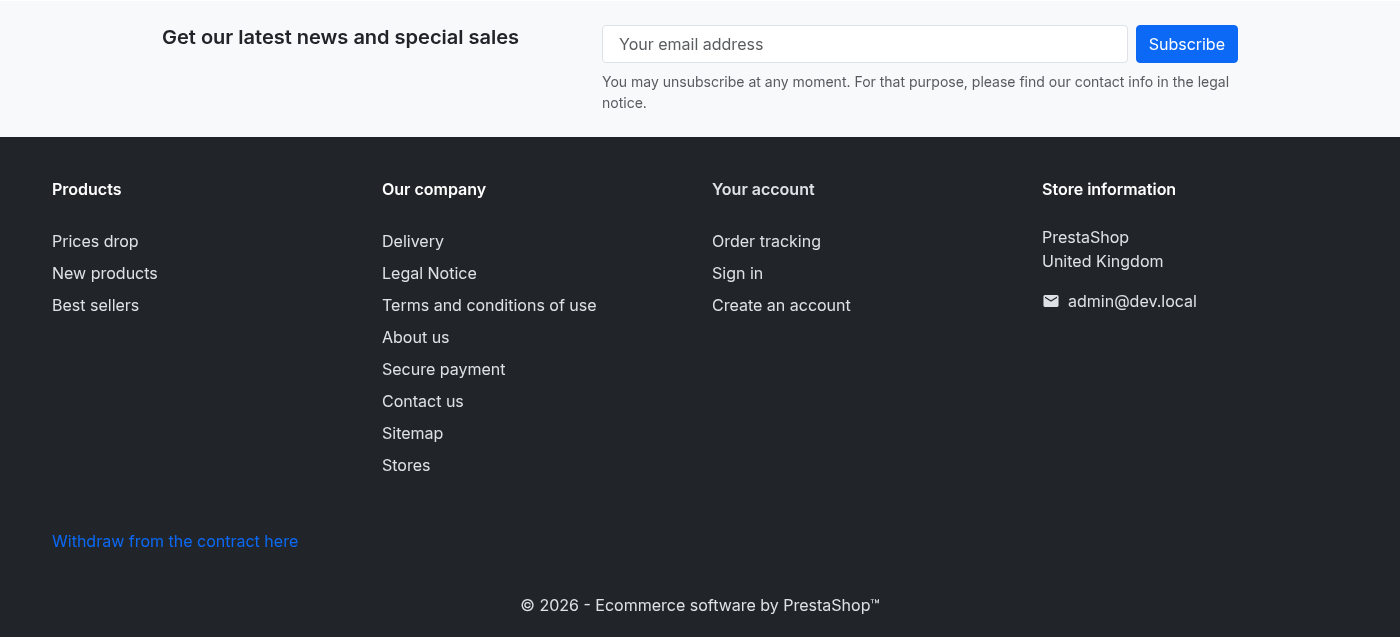
- Link in the footer: the law requires the function to be continuously visible; the footer link covers every page.
- Link in the customer account and Link on the order detail page: extra entry points; the order link pre-selects the order being viewed.
- Withdrawal page URL: a new, read-only field showing the friendly front URL of the withdrawal page (one row per language on multilingual shops), e.g.
https://your-shop/withdrawal. Copy it into a menu module (Main menu, Link List) as a custom link, into a CMS page, or into your emails. With friendly URLs enabled, the page also answers directly at/withdrawal; with friendly URLs disabled, the classicmodule/cll_withdrawal/withdrawallink keeps working unchanged. - Button label per language: leave empty for the compliant default ("Withdraw from the contract here", translated). Keep explicit wording: vague labels are not compliant.
- Order window (days): logged-in customers can pick orders placed within this window (default 30, a margin over the legal 14 days). Guests can always look up any order: the declaration is never blocked.
- Exempt category / product IDs: products exempt from the withdrawal right (personalized, perishable, sealed goods...). The customer sees a legal notice but the declaration is never blocked.
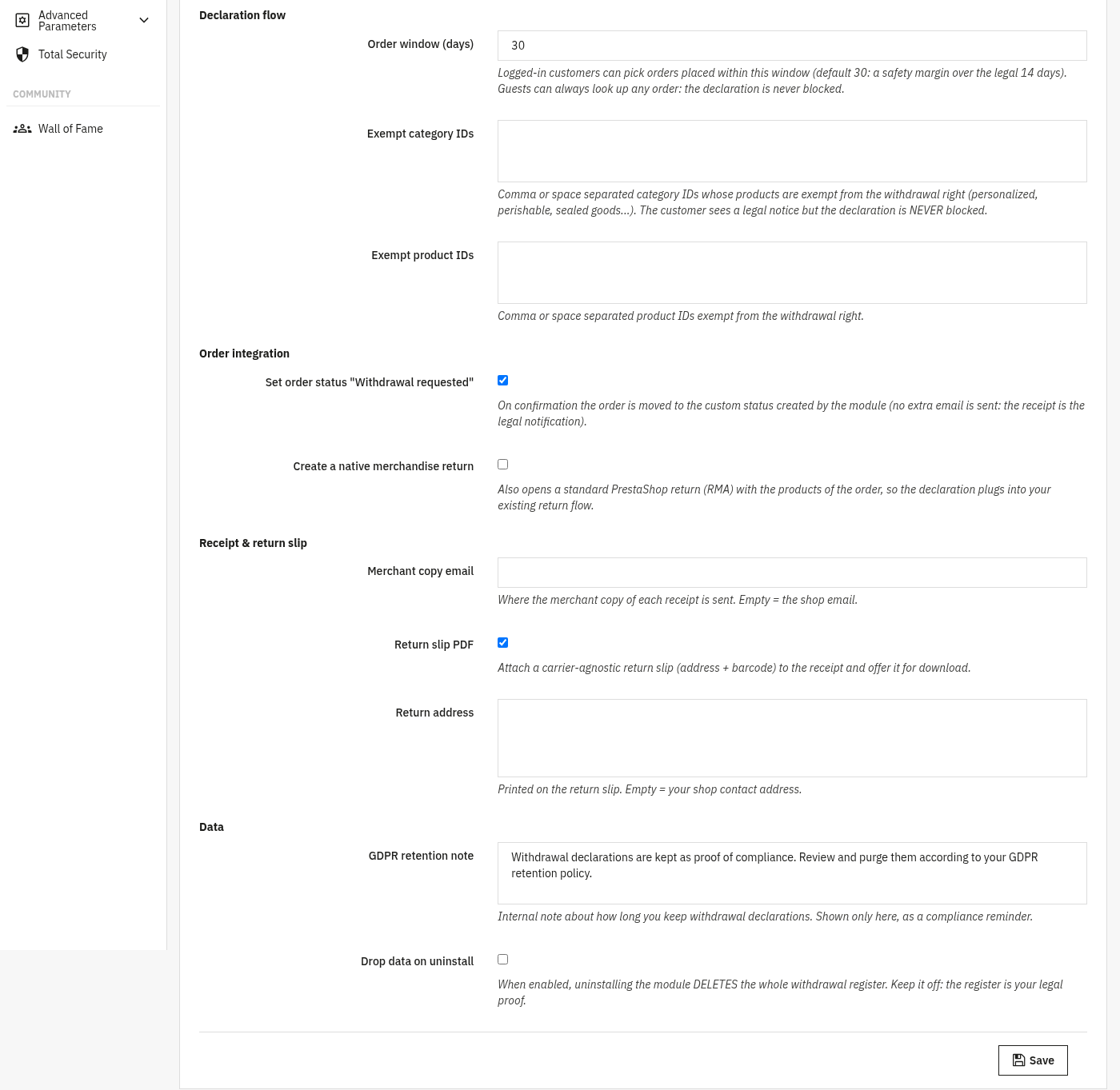
The lower part of the form covers how the declaration integrates with your orders, the receipt and return slip, and data retention.
- Set order status "Withdrawal requested": on confirmation the order moves to the custom status created by the module (no extra email, the receipt is the legal notification).
- Create a native merchandise return: also opens a standard PrestaShop return (RMA) so the declaration plugs into your existing return flow.
- Merchant copy email: where the merchant copy of each receipt is sent; empty means the shop email.
- Return slip PDF: attach a carrier-agnostic return slip (address and barcode) to the receipt and offer it for download.
- Return address: printed on the return slip; empty means your shop contact address.
- GDPR retention note: an internal reminder of how long you keep declarations, shown only here.
- Drop data on uninstall: when enabled, uninstalling deletes the whole register. Keep it off: the register is your legal proof.
Front office v1.2.3
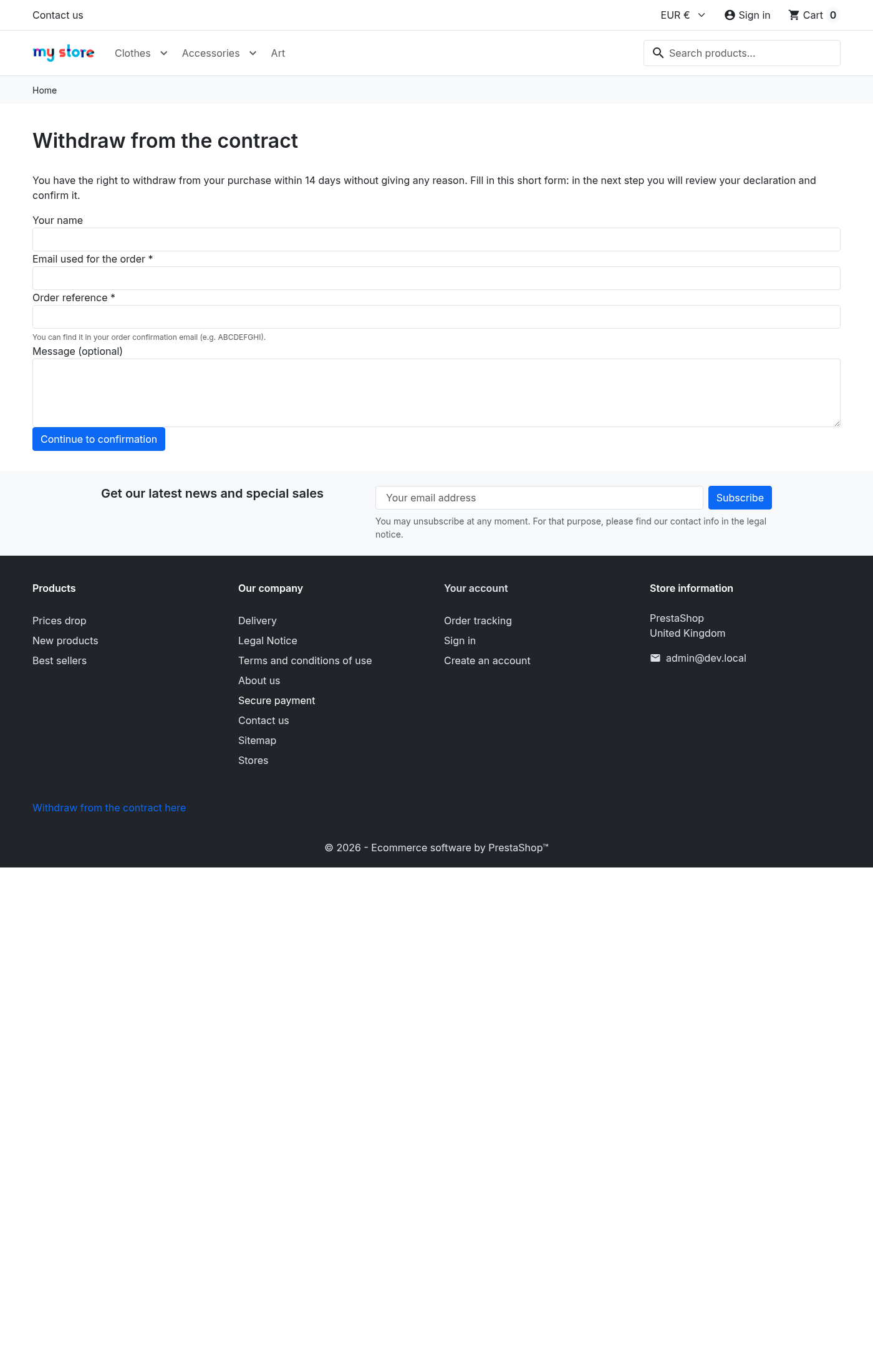
Two ways for a customer to reach the withdrawal form: the always-visible footer link, and the friendly /withdrawal page URL that can also be placed in a menu, a CMS page or an email.
3. Check that it works
- Open the front office and confirm the withdrawal link is visible in the footer on every page.
- Visit
https://your-shop/withdrawaldirectly and confirm the form loads. - Run through the two-step confirmation as a customer for a test order and submit a declaration.
- Check the new declaration appears in the Withdrawal register with its legal timestamp and refund countdown, and that the durable receipt email arrives.
- Open the declaration and download the return slip PDF (if enabled) to confirm it carries the return address and barcode.
4. FAQ
Is the declaration ever blocked?
No. Even for exempt categories or products the customer sees a legal notice but can always submit; the law requires the function to stay available.
Does it send an extra email to the customer?
The durable receipt is the legal notification. The order status change does not add a separate email.
Do I need to edit my theme?
No. EU Withdrawal Button works through standard hooks (footer, account, order) and is compatible with any theme.
What if I don't use friendly URLs?
The page still works at the classic module/cll_withdrawal/withdrawal address; only the short /withdrawal alias needs friendly URLs enabled.
Why keep the register on uninstall?
The register is your legal proof of each declaration, so Drop data on uninstall should stay off.