
SEO Redirects - 301/302/404 manager. SEO Redirects manages 301/302 redirects (plain, wildcard or safe regex), monitors 404 errors and turns them into redirects in one click, auto-creates 301s when a slug changes, imports/exports CSV and detects duplicate URLs. Every target is open-redirect safe. No coding, no theme edits.
SEO Redirects manages 301/302 redirects (plain, wildcard or safe regex), monitors 404 errors and turns them into redirects in one click, auto-creates 301s when a slug changes, imports/exports CSV and detects duplicate URLs. Every target is open-redirect safe. No coding, no theme edits.
1. Installation
- In the back office go to Modules → Module Manager → Upload a module and select the module ZIP.
- Once installed, click Configure. A short panel opens with a Go to configuration button that takes you to the full configuration page.

.local, .test, localhost) are always allowed. When a new version is available it is shown right inside the module.2. Configuration: step by step
The module is organised in tabs: Redirects, 404 monitor, Import / Export, Pretty URL helper and Settings. Start in Settings to switch the engine on, then add or import your redirects.
- Redirects: list, filter and bulk-manage your rules, or add one with a source, target, 301/302 type, optional wildcard/regex pattern matching and "append query string" option. Targets must be internal or whitelisted (open-redirect protection).
- 404 monitor: every missing URL a visitor hits is logged here; click Create 301 to turn it into a redirect in one step.
- Import / Export: export all rules to CSV (semicolon separated), or import a CSV with columns
source, target, type, is_regex, keep_querystring, activein any order. - Pretty URL helper: surfaces URLs that look like duplicates (same path differing only by case or a trailing slash) so you can redirect the variant to the canonical form.
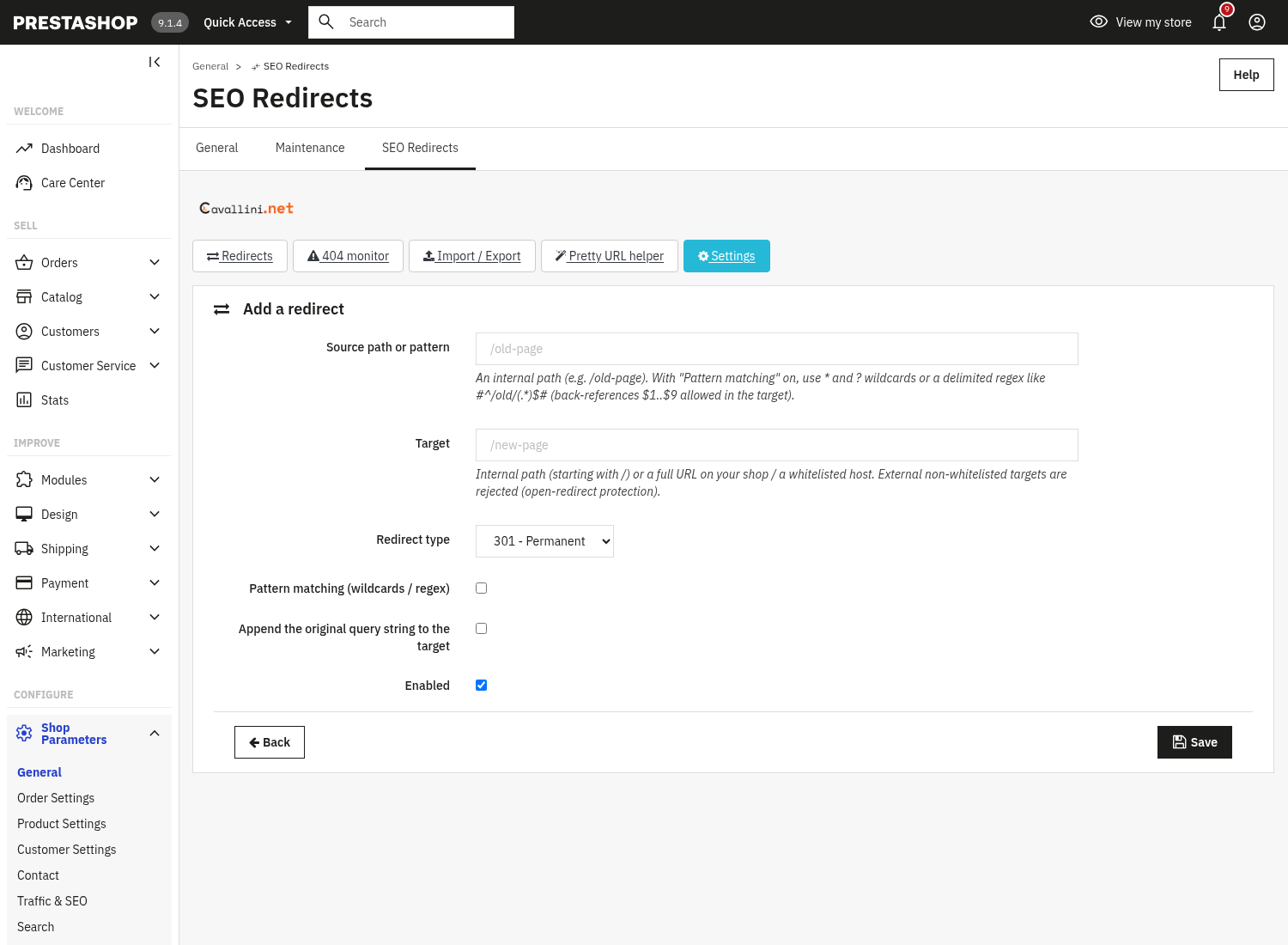
Add a redirect
From the Redirects tab, click Add a redirect to open the rule form.
- Source path or pattern: the incoming path, e.g.
/old-page. With Pattern matching on you can use*and?wildcards or a delimited regex. - Target: an internal path (starting with
/) or a URL on your shop or a whitelisted host. External, non-whitelisted targets are rejected (open-redirect protection). - Redirect type: 301 Permanent or 302 Temporary.
- Shop scope multistore, on a multistore installation the form shows a Shop scope selector: restrict the redirect to one shop, or apply it to All shops.
- Pattern matching and Append the original query string to the target: optional per-rule switches.
Settings master switch
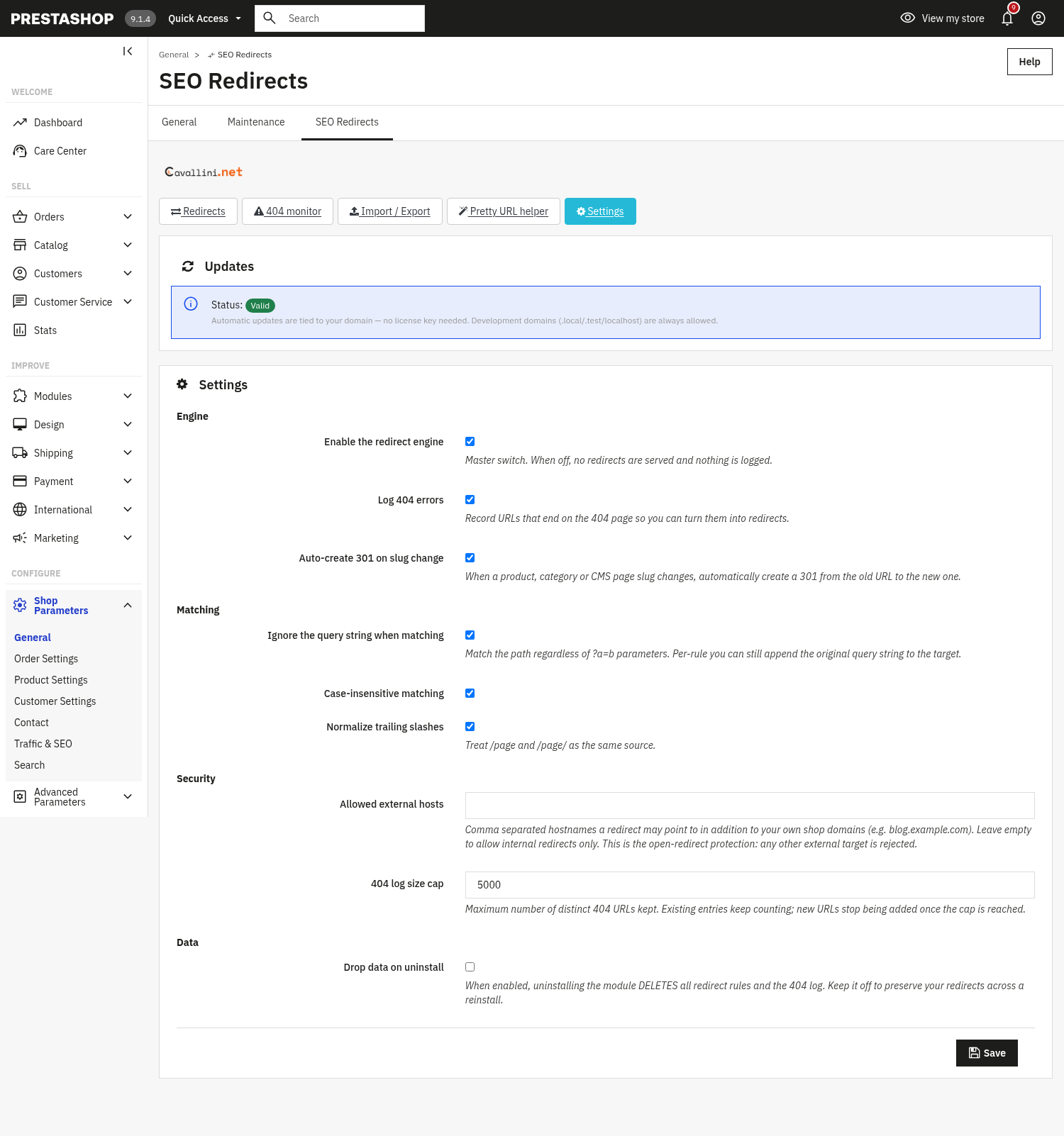
The Settings tab groups the engine switch, matching behaviour, the open-redirect security and data handling.
- Enable the redirect engine: master switch. When off, no redirects are served and nothing is logged.
- Log 404 errors: record URLs that end on the 404 page so you can turn them into redirects.
- Auto-create 301 on slug change: when a product, category or CMS page slug changes, automatically create a 301 from the old URL to the new one.
- Ignore the query string when matching: match the path regardless of
?a=bparameters (you can still append the original query string per rule). - Case-insensitive matching and Normalize trailing slashes: treat
/Page,/pageand/page/as the same source. - Allowed external hosts: comma-separated hostnames a redirect may point to besides your own shop domains. Leave empty to allow internal redirects only, this is the open-redirect protection; any other external target is rejected.
- 404 log size cap: the maximum number of distinct 404 URLs kept.
- Drop data on uninstall: when enabled, uninstalling deletes all rules and the 404 log. Keep it off to preserve redirects across a reinstall.
3. Check that it works
- In Settings, make sure "Enable the redirect engine" is on, then add a redirect (e.g.
/old-page→/new-page) and visit the old URL, you should land on the new one. - Visit a URL that does not exist: with "Log 404 errors" on it appears in the 404 monitor, where Create 301 pre-fills the rule form with that URL.
- Export your rules to CSV, then re-import the file, the import report shows how many were imported or skipped.
- Try a redirect to an external, non-whitelisted host: it is rejected (open-redirect protection).
4. FAQ
What is the difference between 301 and 302?
301 is a permanent redirect (passes SEO value to the new URL); 302 is temporary. Use 301 for moved pages and 302 only for short-lived changes.
Can a redirect point anywhere?
No. Targets must be an internal path or a URL on your shop or a whitelisted host. This open-redirect protection applies to manual rules, CSV imports and saved rules alike.
Do wildcards and regex work?
Yes. Turn on "Pattern matching" on a rule to use * and ? wildcards or a delimited regex; safe back-references $1..$9 can be used in the target. Unsafe regex is rejected.
Will it slow down my shop?
No. Matching is lightweight and runs only when needed, and it is compatible with any theme through standard hooks.