
Elasticsearch Search & Faceted Navigation. This module replaces PrestaShop’s slow SQL search with a real search engine, Elasticsearch, OpenSearch or Meilisearch, and adds a modern, fully configurable faceted navigation. Customers get instant autocomplete with thumbnails and prices, forgiving typo-tolerant results, and a clean “Filters” experience in a modern modal filter panel. Prices are always the exact, native prices for each customer group and currency. You can install it and use it right away with PrestaShop’s native search, then connect a search engine whenever you are ready.
This module replaces PrestaShop’s slow SQL search with a real search engine, Elasticsearch, OpenSearch or Meilisearch: and adds a modern, fully configurable faceted navigation. Customers get instant autocomplete with thumbnails and prices, forgiving typo-tolerant results, and a clean “Filters” experience in a modern modal filter panel. Prices are always the exact, native prices for each customer group and currency. You can install it and use it right away with PrestaShop’s native search, then connect a search engine whenever you are ready.
1. Installation
- In the back office go to Modules → Module Manager → Upload a module and select the module ZIP.
- Once installed, click Configure to open the module dashboard.
- The module installs in “None” engine mode by default, so search keeps working on PrestaShop’s native engine from the very first minute, nothing to configure to go live.
.local, .test, localhost) are always allowed. When a new version is available it is shown right inside the module.2. Choosing a search engine
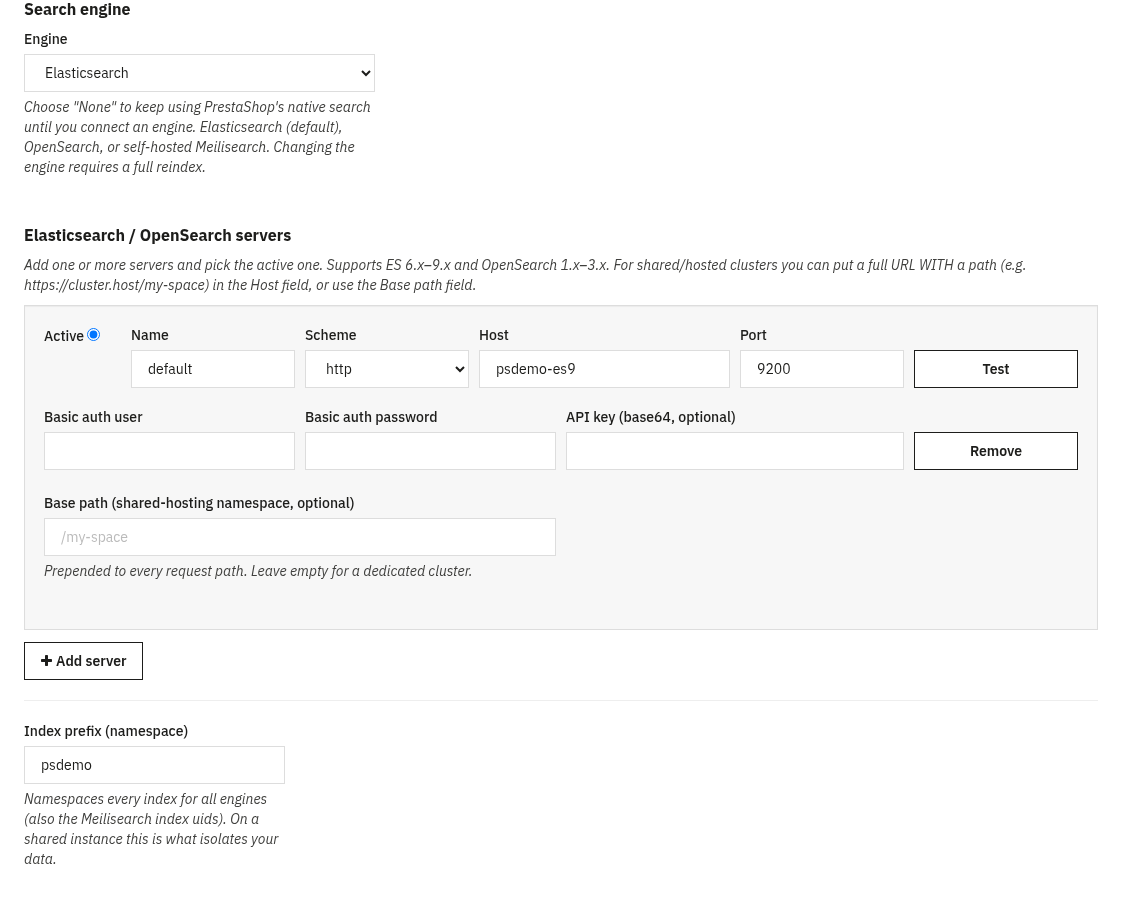
Open the Connections tab and pick your Engine. Everything else in the module talks to the engine through one abstraction, so the storefront behaves the same whichever backend you choose.
Engine options
- None (native): no external engine. The module uses PrestaShop’s built-in search. Use this to install now and connect an engine later; the store is never left without a working search.
- Elasticsearch: the default. Supports major versions 6, 7, 8 and 9 with automatic version detection.
- OpenSearch: auto-detected and handled like a modern typeless cluster regardless of its 1.x/2.x/3.x version.
- Meilisearch: a lightweight, easy-to-host alternative; your searchable fields, facets, synonyms, stop-words and typo tolerance are mapped to Meilisearch automatically.
Connection settings
- Host: the full URL of your engine (it may include a path prefix, e.g.
https://cluster.provider.com/my-space). - Base path: an optional path prefix prepended to every request, for rented search space on shared instances.
- Index prefix: a namespace that isolates your indexes, so several stores can safely share one engine.
- Authentication: for Elasticsearch/OpenSearch: HTTP Basic or API key; for Meilisearch: a Bearer master or scoped key.
- Test connection: verifies the engine is reachable and reports its detected version.
3. Search behaviour
Taking over site search
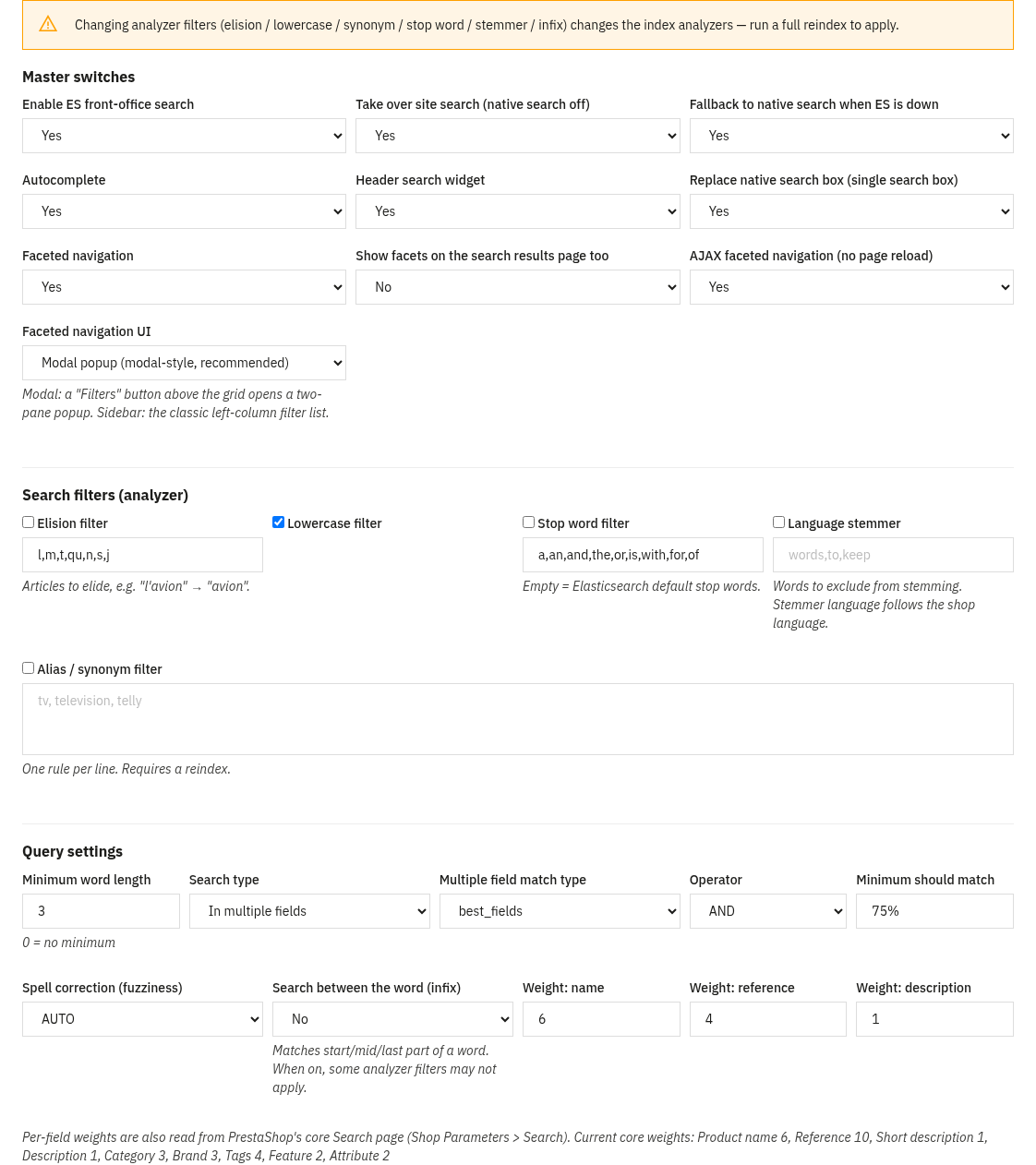
Turn on Take over site search so every search and category listing is served by the engine through PrestaShop’s native product provider, no theme edits. If the engine ever becomes unreachable, the module automatically falls back to native search so the store never shows an error. If ps_facetedsearch is still active, the back office warns you, since you normally want only one faceted module running.
Relevance & tuning
The search-settings panel lets you shape relevance without touching code:
- Field weights: how much the name, reference, description, etc. count toward the score.
- Match type & operator: the multi_match strategy and whether words are combined with AND or OR.
- Fuzziness & minimum-should-match: how forgiving typo tolerance is and how many words must match.
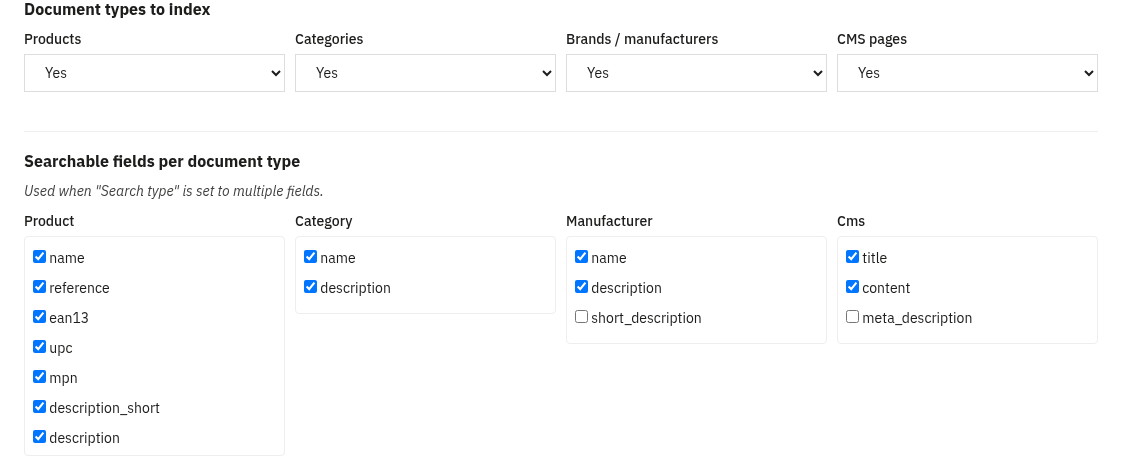
- Minimum word length and the searchable-fields scope per document type.
- Language analysis: synonyms, stop-words, per-language stemmer (with exclusions), elision, lowercase and infix (n-gram) matching for partial words.
4. Faceted navigation
The faceted navigation is a modern, AJAX experience, no page reloads, with a classic sidebar mode available as an alternative (Facet UI option: modal or sidebar).
The modern modal filter panel
- Above the product grid sit a “Filters” button, the live result count and removable chips for every applied value (“Clear all” removes them all).
- Clicking Filters opens a two-pane modal: filter names on the left (with a badge when a filter is in use), the selected filter’s values on the right, and a live “Show N results” button in the footer.
- Filters with many values are grouped A→Z with a “search within this filter” box; colours render as swatches; price shows min/max inputs plus a dual-thumb slider.
- On mobile the modal is full-screen: tap a filter name to drill down to its values, use the back arrow to return, and confirm with a fixed bottom “Show N results” bar.
- Everything updates by AJAX with shareable URLs (back/forward works), and there is a no-JavaScript fallback because every control is a real form control.
Configuring each facet
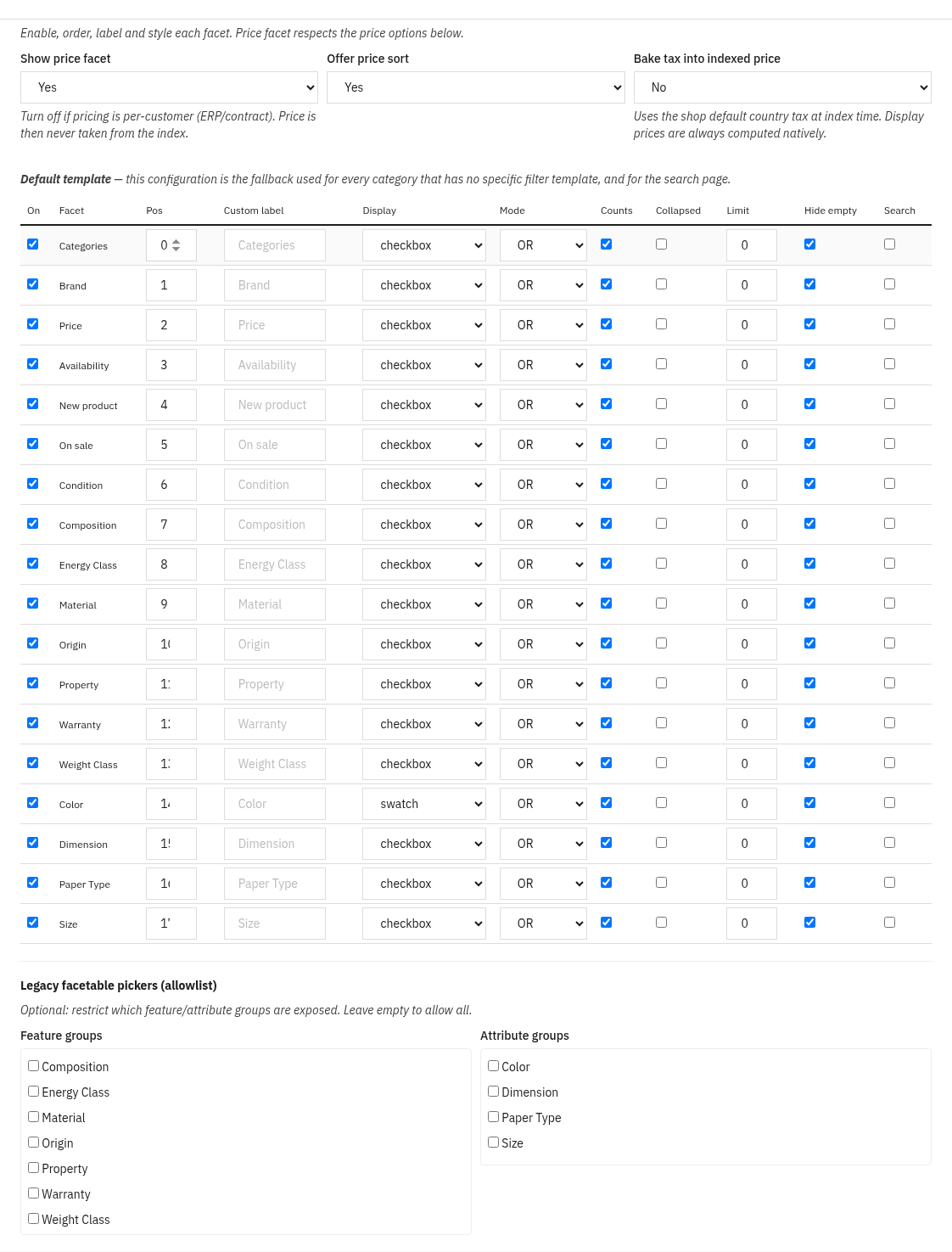
For every facet you control: on/off, order, label per language, display type (checkbox, radio, dropdown, colour swatch, price slider, star rating or searchable list), AND/OR mode, whether to show counts, collapse state, a value limit with “show more”, and hide when empty. Available sources: categories, brands, features, attributes, price, availability, new, on sale and condition. Facets can also be shown on the search results page, not just categories.
Per-category filter templates Filters Pro
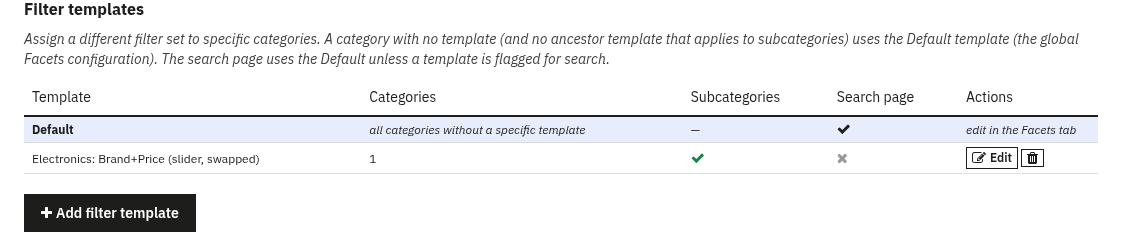
A filter template is a named, reusable facet configuration you can assign to one or more categories, so different categories can expose a different, reordered set of filters. In the Filter templates tab you create a template with the same facet editor as the global config, plus a category tree and an “also apply to subcategories” option. The global Facets configuration is the Default template: the fallback for any category without its own template, and for the search page.
5. Autocomplete
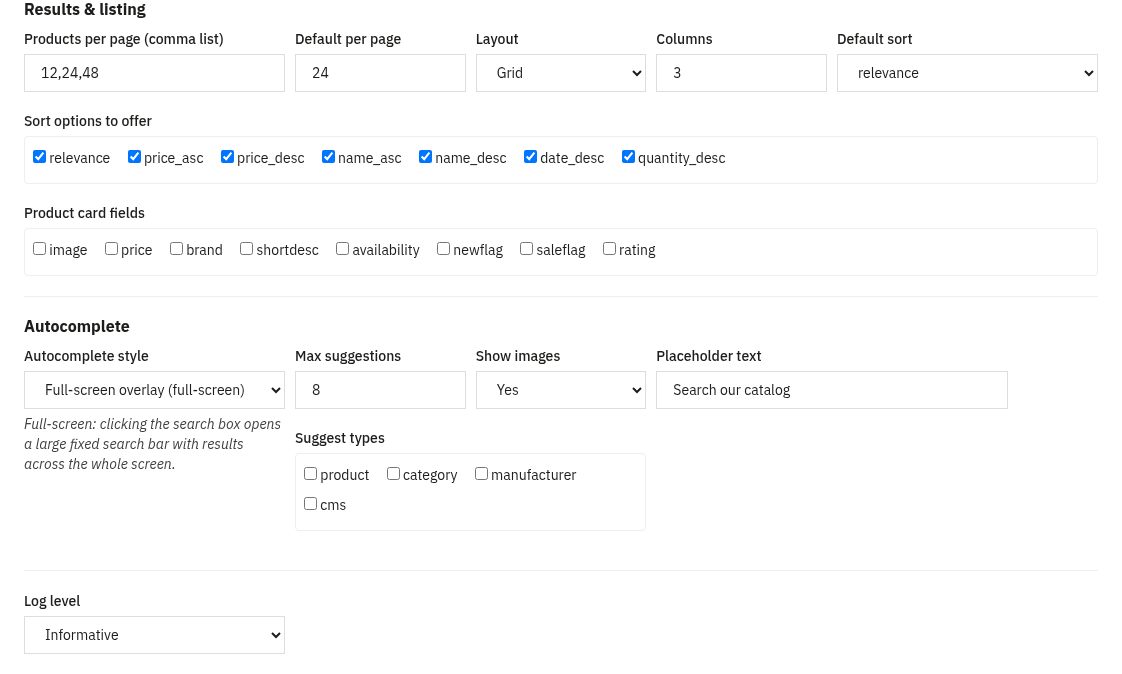
As the customer types, the module suggests products, categories, brands and CMS pages: each labelled by type, with product thumbnails and the correct native price, and typo-tolerant so small mistakes still match. Two presentations are available (Autocomplete style under Output):
- Dropdown: a suggestions panel that opens under the search bar. The classic, compact style.
- Full-screen search overlay: a large fixed search bar with full-screen results, for a bold, search-first experience.
6. Prices done right
Correct prices per group and currency
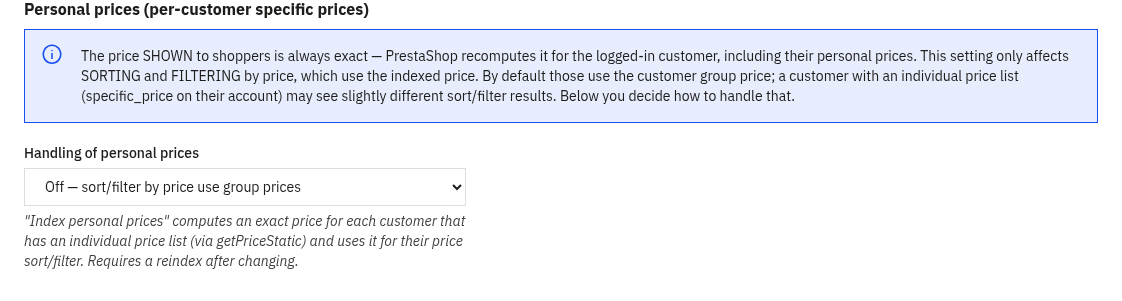
The price a customer sees is always the native PrestaShop price. Prices are indexed per customer group × currency, are specific_price-aware and account for per-country tax, and the right value is picked at query time. This means the optional price facet and price sorting are accurate for every shopper, a wholesale group and a retail group each see and sort by their own prices.
Personal prices for B2B Advanced
On the Advanced tab you can enable personal prices. For B2B customers who have an individual price list (a specific_price assigned to the customer), sorting and filtering by price can use their exact personal price rather than the group price. A configurable cap (fixed, or automatic based on the engine’s free disk space) limits how many customers this is precomputed for, and an optional per-language notice can be shown to those shoppers.
7. SEO filter pages
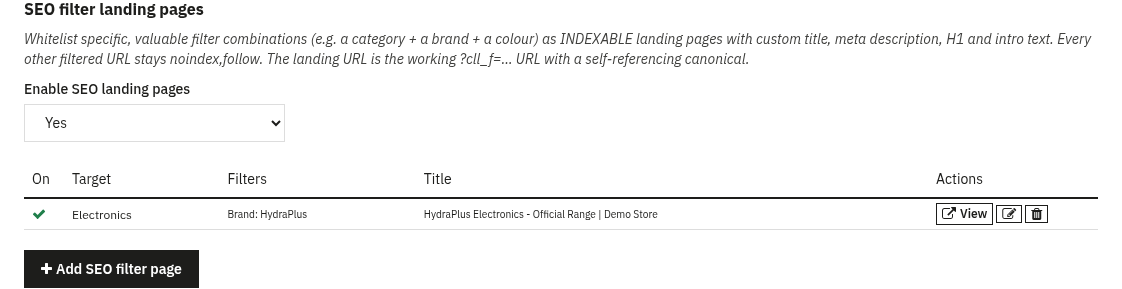
Endless filter combinations would flood Google, so by default every filtered URL is served as noindex,follow. The SEO filter pages tab lets you do the reverse for the combinations that matter: whitelist a specific selection (for example category + brand + colour) as an indexable landing page with a custom meta title, meta description, H1 and intro text per language.
- A matched page is forced to
indexand given a self-referencing canonical to the filtered URL, so it can actually rank. - Your custom H1 and intro are rendered above the product listing.
- All other filtered combinations stay
noindex,follow. - The back-office list shows each page’s live URL, ready to submit or link.
8. Search analytics
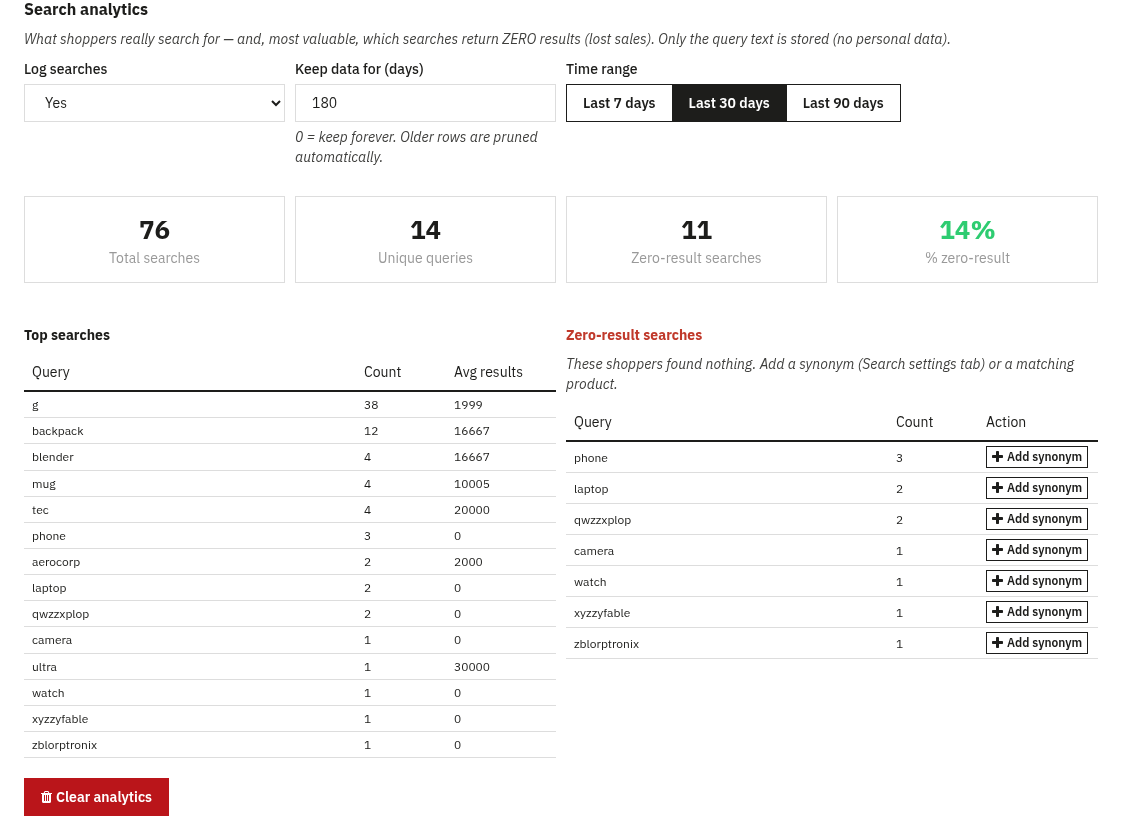
The Search analytics tab shows what customers really search for, recorded from actual results pages, never from autocomplete keystrokes, and storing only the query text (no personal data). Pick a date range (last 7 / 30 / 90 days) and see KPIs (total searches, unique queries, zero-result count and %), a Top searches table and, most usefully, a Zero-result searches table, the searches that found nothing, i.e. lost sales. Each zero-result row has a one-click “Add synonym” shortcut so you can fix it immediately. Logging can be turned off and old rows are pruned automatically after a configurable retention period.
9. Reindexing & cron
The engine needs an index of your catalogue. The module indexes products, categories, brands and CMS pages, each in its own index, and keeps them up to date live as you save, add or delete products and as stock changes.
- Reindex assistant: a guided, batched and resumable reindex with a progress bar. Run it after the first engine connection, after switching engine, or after changing analyzer settings.
- Cron URL: a token-protected URL you can call from a scheduled task (or CLI) to keep the index fresh automatically; it also prunes old analytics rows.
- Delete indexed data: clears the engine’s indexes when you want a clean rebuild.
10. Multistore & shared hosting
Multistore
Connection and engine settings are per shop. In an “all shops” context they are saved globally; in a single-shop context they are saved for that shop, with a global fallback. This means different shops can point at different engines or clusters, while a single-shop install behaves exactly as before.
Shared hosting / rented search space
You do not need your own dedicated cluster. Point the Host at a shared endpoint with a path prefix, set the Base path and an Index prefix (namespace), and add the provider’s API key. Every request is scoped to your prefix, so your data stays isolated on a shared instance, and it works the same across Elasticsearch, OpenSearch and Meilisearch.
11. FAQ
Do I need Elasticsearch to start?
No. The module installs in “None” mode and uses PrestaShop’s native search, so you are live immediately. Connect Elasticsearch, OpenSearch or Meilisearch whenever you are ready.
What happens if my search engine goes down?
The module automatically falls back to native search, so customers can always search, the store never shows an error.
Are the prices shown to customers correct?
Yes. The displayed price is always the native PrestaShop price. The engine is only used to filter and sort, using prices indexed per customer group and currency (and, optionally, each B2B customer’s personal price).
Will it clash with ps_facetedsearch?
You normally want only one faceted module active. The back office warns you if ps_facetedsearch is still on so you can disable it.
Can different categories show different filters?
Yes. Create filter templates and assign them to categories (optionally including subcategories). Categories without a template use the global default.
Which engine should I choose?
Elasticsearch is the default and most common. OpenSearch is a drop-in equivalent. Meilisearch is the lightest to host and a great fit for shared hosting or smaller catalogues.