
Web Application Firewall. Web Application Firewall blocks abusive IPs, CIDR ranges, whole countries and bad bots, rate-limits aggressive clients, protects your back-office login from brute force and stops common attack patterns (SQLi / XSS / LFI / probing). A trusted whitelist with anti-lockout protection keeps you safe, and every blocked request is logged. No coding, no theme edits.
Web Application Firewall blocks abusive IPs, CIDR ranges, whole countries and bad bots, rate-limits aggressive clients, protects your back-office login from brute force and stops common attack patterns (SQLi / XSS / LFI / probing). A trusted whitelist with anti-lockout protection keeps you safe, and every blocked request is logged. No coding, no theme edits.
1. Installation
- In the back office go to Modules → Module Manager → Upload a module and select the module ZIP.
- Once installed, click Configure to open the setup wizard.
.local, .test, localhost) are always allowed. When a new version is available it is shown right inside the module.2. Configuration: step by step
The module is organised in tabs: Rules & whitelist, Blocked log, Login protection and Settings. The sections below follow the Settings tab, where every protection has its own toggle.
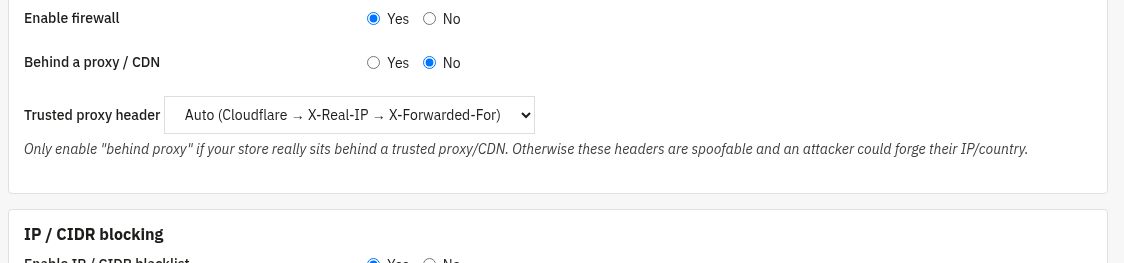
General master switch
The on/off switch for the whole firewall, plus how the client IP is read.
- Enable firewall: master switch. Off = nothing is filtered on the front office.
- Behind a proxy / CDN: enable only if your store really sits behind a trusted proxy or CDN. Otherwise proxy headers are spoofable and an attacker could forge their IP/country.
- Trusted proxy header: which header carries the real client IP: Auto (Cloudflare → X-Real-IP → X-Forwarded-For), CF-Connecting-IP, X-Real-IP or X-Forwarded-For.
IP / CIDR blocking
Block individual IP addresses or whole CIDR ranges.
- Enable IP / CIDR blacklist: turns IP/range blocking on.
- The actual blacklist and whitelist entries are managed under the Rules & whitelist tab. A whitelisted IP/CIDR bypasses every other check.

Country blocking
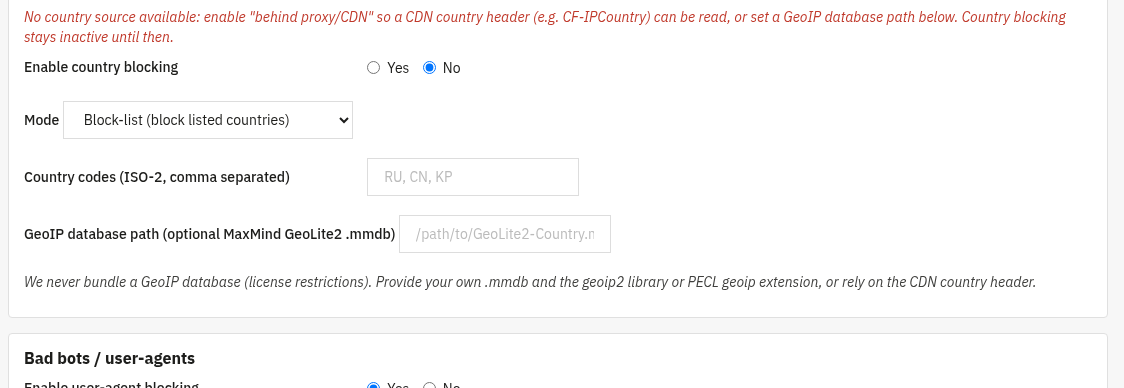
Allow or deny visitors by country (ISO-2 codes).
- Enable country blocking: turns the geo filter on.
- Mode: Block-list (block the listed countries) or Allow-list (allow only the listed countries).
- Country codes: comma-separated ISO-2 codes, e.g.
RU, CN, KP. - GeoIP database path: optional path to your own MaxMind GeoLite2
.mmdbfile. No GeoIP database is bundled (licence restrictions); provide your own, or rely on a CDN country header (e.g. CF-IPCountry) by enabling "behind proxy/CDN".
Bad bots / user-agents
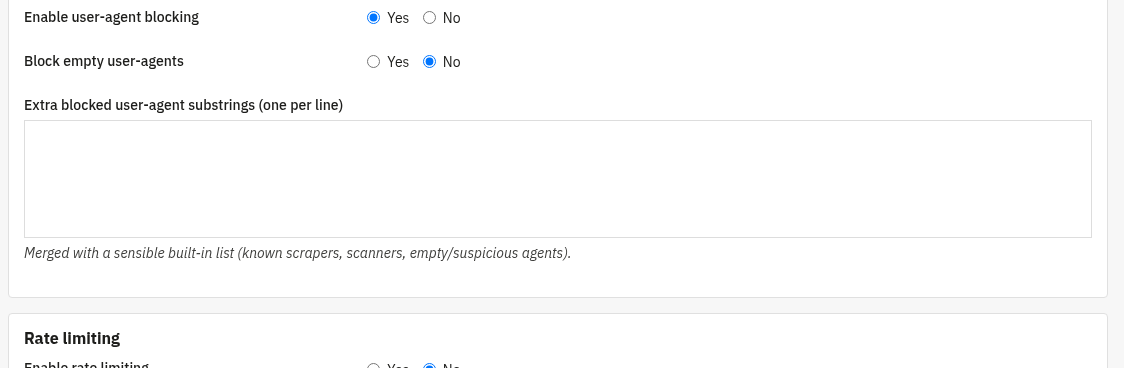
Block known scrapers, scanners and suspicious clients by their User-Agent.
- Enable user-agent blocking: turns UA filtering on.
- Block empty user-agents: rejects requests that send no User-Agent at all.
- Extra blocked user-agent substrings: one substring per line; merged with a sensible built-in list of known scrapers and scanners.
Rate limiting
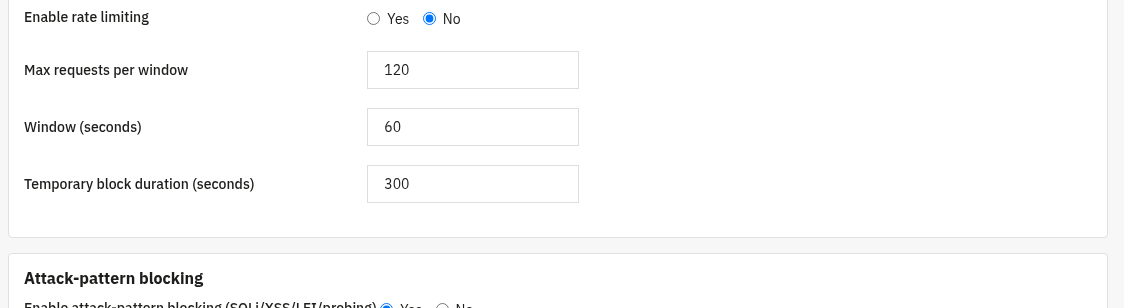
Throttle clients that send too many requests in a short time.
- Enable rate limiting: turns the limiter on.
- Max requests per window: how many requests an IP may send before being throttled.
- Window (seconds): the rolling time window the requests are counted in.
- Temporary block duration (seconds): how long an offending IP stays blocked.
Attack-pattern blocking
Detect and block common attack signatures in requests.
- Enable attack-pattern blocking: blocks SQLi, XSS, LFI and probing patterns.
- Add your own custom patterns, or whitelist legitimate URLs that would otherwise match, under the Rules & whitelist tab.

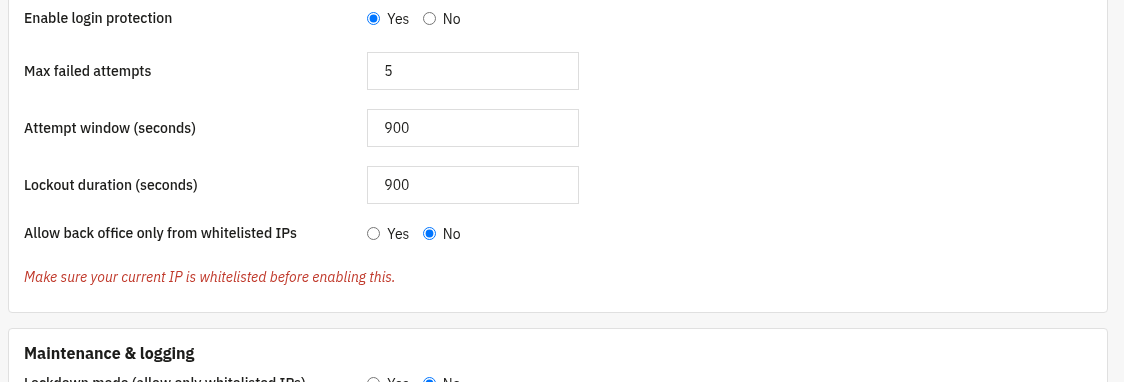
Back-office login protection
Defend the admin login against brute-force attempts.
- Enable login protection: tracks failed back-office logins per IP and username.
- Max failed attempts, Attempt window (seconds) and Lockout duration (seconds): after too many failures in the window, the source is locked out temporarily.
- Allow back office only from whitelisted IPs: restricts admin access to whitelisted IPs. Make sure your current IP is whitelisted first (the page shows your IP and warns you if it is not).
Maintenance & logging
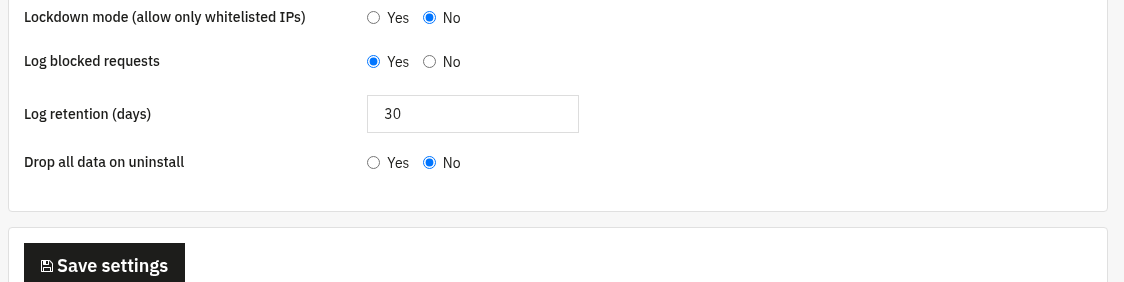
Lockdown mode and the blocked-requests log.
- Lockdown mode: allow only whitelisted IPs to reach the store (emergency lockout). Whitelist your IP first.
- Log blocked requests: records every blocked request (browse and export it under the Blocked log tab).
- Log retention (days): how long log rows are kept.
- Drop all data on uninstall: when enabled, removing the module also deletes its rules and logs.
3. Check that it works
- On the Rules & whitelist tab, the banner shows your current IP and whether it is whitelisted, add it before enabling lockdown or BO-whitelist-only.
- Add a test bad user-agent substring, then request a page with that User-Agent, it should be blocked and appear in the Blocked log.
- Open the Blocked log tab: blocked requests appear with their IP, country, reason and URI; you can filter, export to CSV or clear the log.
- The Login protection tab lists failed back-office logins and lets you clear a lockout in one click.
4. FAQ
Could I lock myself out?
The Rules tab always shows your current IP and warns you if it is not whitelisted. Whitelist it before enabling lockdown or BO-whitelist-only and you cannot be locked out.
Does country blocking need an external service?
No. It reads a CDN country header when you are behind a proxy/CDN, or your own MaxMind GeoLite2 database. No GeoIP data is bundled and no calls leave your server.
Will it slow down my shop?
No. Checks are lightweight and run early in the request; legitimate visitors are not affected.
Do I need to edit my theme?
No. The firewall works through standard hooks and is compatible with any theme.