Blog & News with AI article generation. Blog & News is a full blog/news CMS for PrestaShop: categories, articles, tags, moderated comments, a latest-articles widget, an RSS feed and built-in SEO (schema.org JSON-LD, Open Graph, canonical URLs). Draft articles can be generated with your own AI key (OpenAI, Anthropic or Gemini). Your categories, articles, tags and comments are managed in their own back-office tabs under the Blog menu; this guide covers the settings screen.
Blog & News is a full blog/news CMS for PrestaShop: categories, articles, tags, moderated comments, a latest-articles widget, an RSS feed and built-in SEO (schema.org JSON-LD, Open Graph, canonical URLs). Draft articles can be generated with your own AI key (OpenAI, Anthropic or Gemini). Your categories, articles, tags and comments are managed in their own back-office tabs under the Blog menu; this guide covers the settings screen.
1. Installation
- In the back office go to Modules → Module Manager → Upload a module and select the module ZIP.
- Once installed, click Configure to open the settings screen. The new Blog menu (Categories, Articles, Comments) appears in the back office.
.local, .test, localhost) are always allowed. When a new version is available it is shown right inside the module.2. Configuration: step by step
The Configure screen holds the blog display options and your AI provider keys. Day-to-day content (categories, articles, tags, comments) lives in the dedicated Blog tabs.
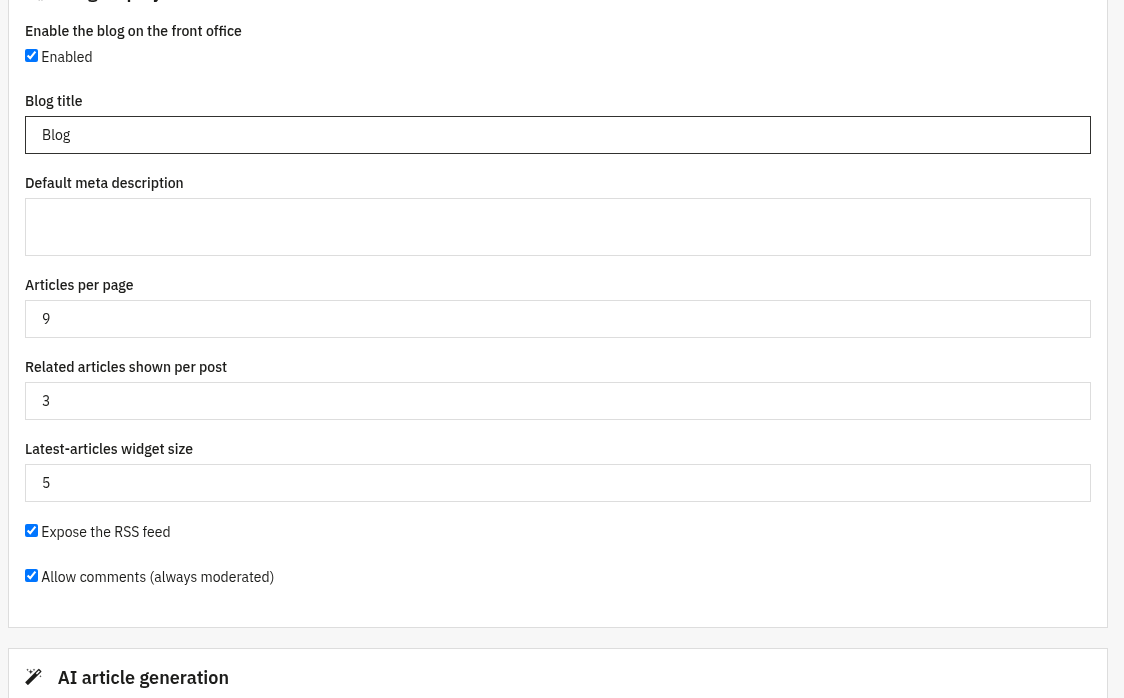
Blog display
Controls how the blog appears in your front office and which features are exposed.
- Enable module: the on/off switch for the whole blog. Nothing is shown in the front office until this is on.
- Articles per page: how many articles are listed on the blog home and category pages (default 9).
- Allow comments: turn front-office comments on or off. Comments are always moderated: they appear only after you approve them.
- Related articles: how many related articles are shown at the bottom of an article (default 3).
- Latest-articles widget: how many articles the widget shows on the home page and in the left column (default 5).
- RSS feed: expose the blog RSS feed for readers and aggregators.
- Blog title and Meta description: the default heading and SEO meta description for the blog home page.
AI article generation optional
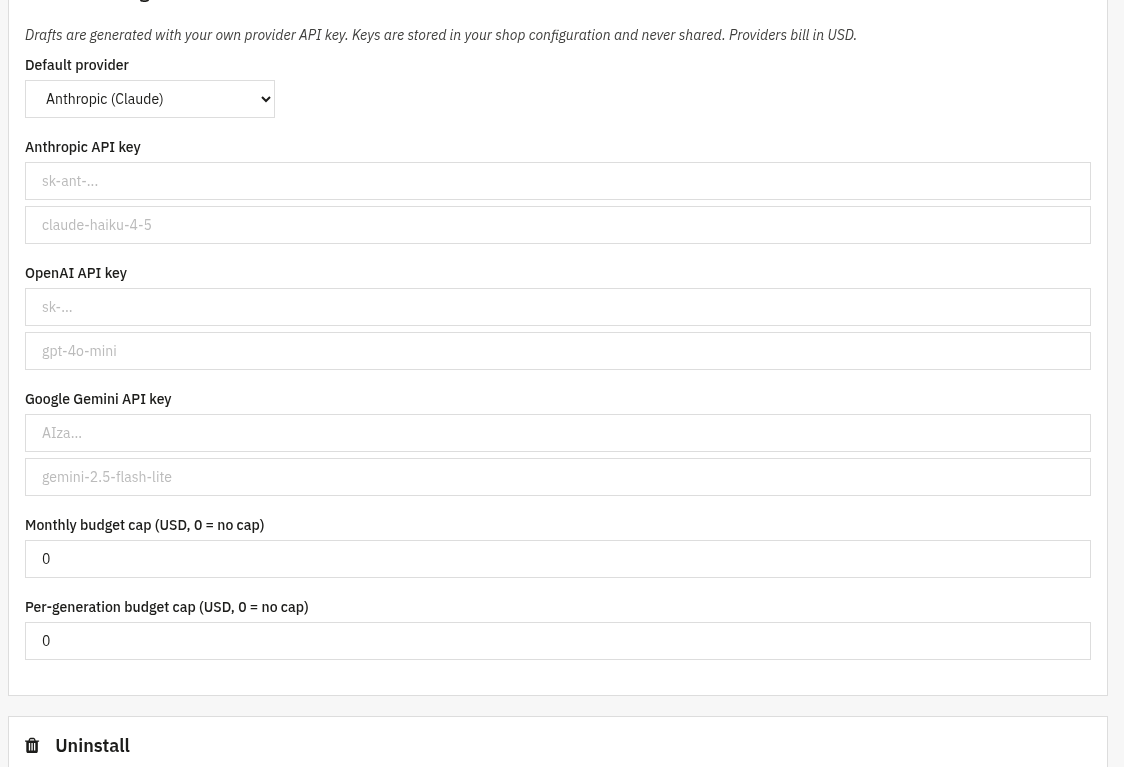
Optionally draft articles with your own AI account. Set your provider and key here, then generate drafts from the article editor. This is optional, the whole blog works without it.
- AI provider: choose OpenAI, Anthropic or Gemini.
- API key: paste your own key for the provider (stored securely; leave the field blank to keep the current one).
- Model: the model id per provider; leave blank to use a sensible cheap default (e.g.
gpt-4o-mini,claude-haiku-4-5,gemini-2.5-flash-lite). - Monthly budget and Per-run budget: optional USD caps on AI spend (0 = no cap).
- In the article editor you then enter a topic, pick a tone (professional, friendly, enthusiastic, informative, persuasive), a target word count and the language, and click generate, the result is saved as a draft for you to review and publish.
3. Check that it works
- Open the blog front page on your shop and confirm your articles and categories are listed.
- Check that the latest-articles widget renders on the home page / left column.
- With an AI key set, open the article editor, enter a topic and generate a draft article: it should appear as a draft.
- Verify the RSS feed loads (the feed link in the footer) and lists your latest articles.
4. FAQ
Which AI providers are supported?
OpenAI, Anthropic and Google Gemini. You pick one in the settings and use your own account.
Is the AI key required?
No. AI drafting is optional, the blog, categories, articles, tags, comments, widget, RSS and SEO all work without any key.
Are comments moderated?
Yes. Front-office comments are always moderated and appear only after you approve them in the Comments tab.
Who pays for the AI usage?
You do, directly to your chosen provider, the module uses your own API key. Optional monthly and per-run budget caps help you stay in control.