
Captcha Anti-Spam - reCAPTCHA, hCaptcha & Turnstile. Captcha Anti-Spam protects your storefront forms (login, registration, forgot password, contact, newsletter, product review and guest checkout) against bots and spam using the provider of your choice: Google reCAPTCHA v2/v3, hCaptcha or Cloudflare Turnstile. Verification is done server-side over HTTPS, each form has its own toggle, and trusted IPs or logged-in customers can be skipped. No coding, no theme edits.
Captcha Anti-Spam protects your storefront forms (login, registration, forgot password, contact, newsletter, product review and guest checkout) against bots and spam using the provider of your choice: Google reCAPTCHA v2/v3, hCaptcha or Cloudflare Turnstile. Verification is done server-side over HTTPS, each form has its own toggle, and trusted IPs or logged-in customers can be skipped. No coding, no theme edits.
1. Installation
- In the back office go to Modules → Module Manager → Upload a module and select the module ZIP.
- Once installed, click Configure to open the settings screen.
.local, .test, localhost) are always allowed. When a new version is available it is shown right inside the module.2. Configuration: step by step
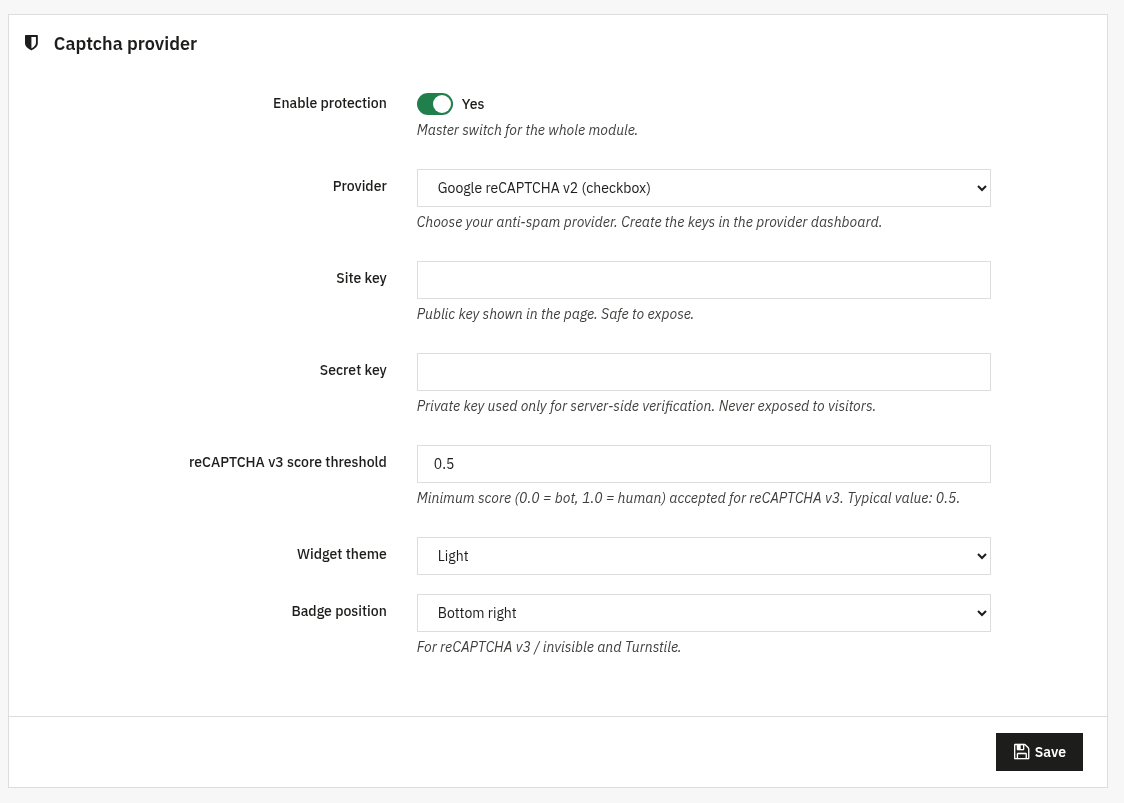
The Configure screen is organised in panels: Captcha provider, Protected forms, Advanced and Rate limiting. Each panel has its own Save button.
Captcha provider start here
The master switch plus your provider and its keys.
- Enable protection: master switch for the whole module. Off = no captcha is shown or validated on the front office.
- Provider: choose Google reCAPTCHA v2 (checkbox or invisible), reCAPTCHA v3, hCaptcha or Cloudflare Turnstile. Create the keys in the provider dashboard.
- Site key: the public key shown in the page. Safe to expose.
- Secret key: the private key, used only for server-side verification. Never reaches the browser.
- reCAPTCHA v3 score threshold: minimum score (0.0 = bot, 1.0 = human) accepted for reCAPTCHA v3. Typical value:
0.5. - Widget theme: Light or Dark, to match your storefront.
- Badge position: Bottom right, Bottom left or Inline (for reCAPTCHA v3 / invisible and Turnstile).
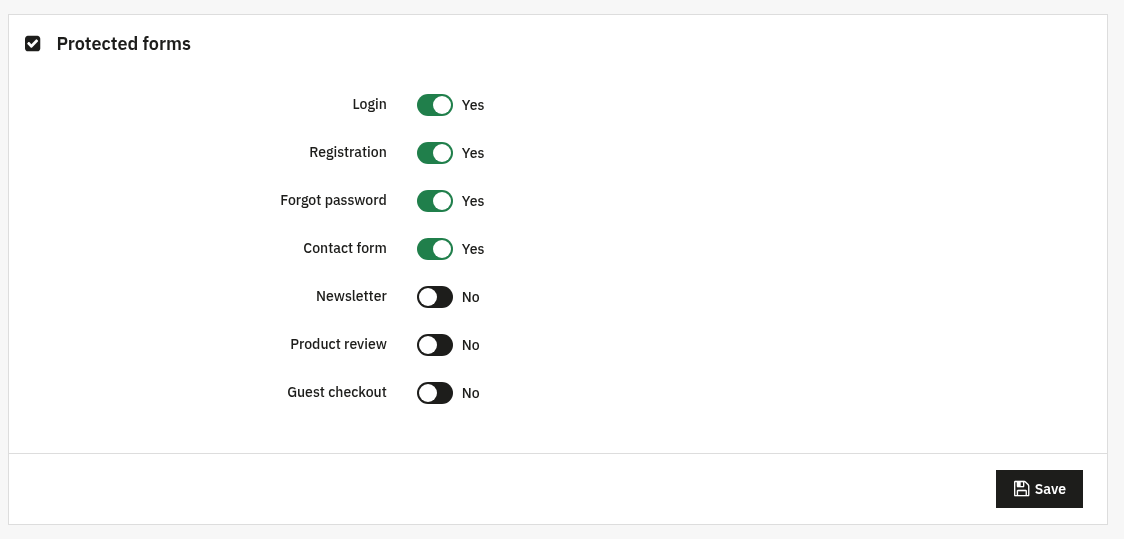
Protected forms
Turn the captcha on, form by form. Enable only the forms you actually want to protect.
- Login, Registration, Forgot password, Contact form, Newsletter, Product review and Guest checkout: each has an independent toggle.
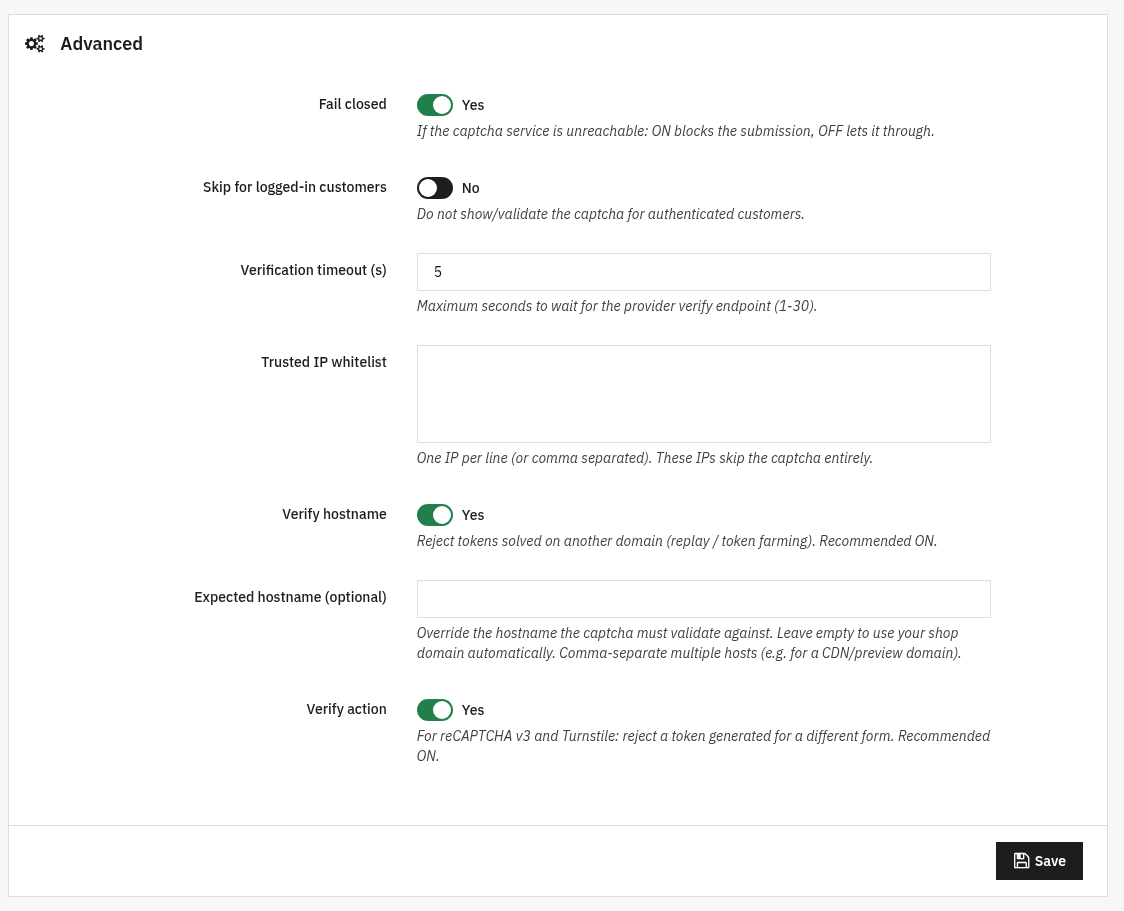
Advanced optional
Fine-tune the verification behaviour. The defaults are sensible; you can leave them as they are.
- Fail closed: if the captcha service is unreachable: ON blocks the submission, OFF lets it through.
- Skip for logged-in customers: do not show or validate the captcha for authenticated customers.
- Verification timeout (s): maximum seconds to wait for the provider verify endpoint (1–30).
- Trusted IP whitelist: one IP per line (or comma separated). These IPs skip the captcha entirely.
- Verify hostname: reject tokens solved on another domain (replay / token farming). Recommended ON.
- Expected hostname (optional): override the hostname the captcha must validate against. Leave empty to use your shop domain automatically; comma-separate multiple hosts (e.g. a CDN/preview domain).
- Verify action: for reCAPTCHA v3 and Turnstile: reject a token generated for a different form. Recommended ON.
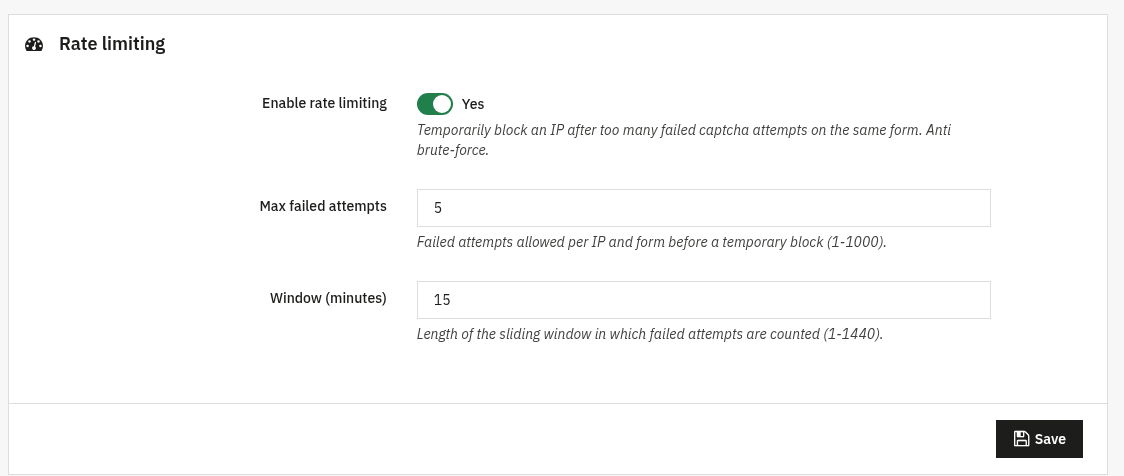
Rate limiting optional
Temporarily block an IP after too many failed captcha attempts on the same form, extra anti brute-force.
- Enable rate limiting: turns the limiter on.
- Max failed attempts: failed attempts allowed per IP and form before a temporary block (1–1000).
- Window (minutes): length of the sliding window in which failed attempts are counted (1–1440).
3. Check that it works
- Open a protected page in the front office (e.g. the login or contact page) and confirm the captcha widget appears.
- Submit the form without solving the captcha, it should be refused with an anti-spam message.
- For reCAPTCHA v3 / Turnstile, check the floating badge shows in the position you chose.
- If you whitelisted your IP or enabled "Skip for logged-in customers", confirm the captcha is correctly skipped in those cases.
4. FAQ
Which provider should I pick?
Any of the four works. reCAPTCHA v2 shows a visible challenge; reCAPTCHA v3 and Turnstile are invisible and score-based; hCaptcha is a privacy-focused alternative. Create the matching site/secret keys in that provider's dashboard.
Will it slow down my shop?
No. Verification happens server-side only when a protected form is submitted, and trusted IPs or logged-in customers can be skipped entirely.
Do I need to edit my theme?
No. The module injects the widget through standard hooks and is compatible with any theme.
What happens if the captcha service is down?
You decide. With Fail closed ON the submission is blocked; with it OFF the form is let through so legitimate visitors are never stuck.