
Abandoned Cart Recovery. Recover abandoned carts: an automated reminder email sequence, an optional dedicated voucher, a secure one-click recovery link and a recovery dashboard. GDPR-aware and runs from cron, so it works quietly in the background, no coding, no theme edits.
Recover abandoned carts: an automated reminder email sequence, an optional dedicated voucher, a secure one-click recovery link and a recovery dashboard. GDPR-aware and runs from cron, so it works quietly in the background, no coding, no theme edits.
1. Installation
- In the back office go to Modules → Module Manager → Upload a module and select the module ZIP.
- Once installed, click Configure to open the setup wizard.
.local, .test, localhost) are always allowed. When a new version is available it is shown right inside the module.2. Configuration: step by step
The module adds an Abandoned Carts back-office page with three tabs: a Dashboard (recovery statistics), the Abandoned carts list, and Settings. Configure opens the Settings tab, work through it once, then let the cron do the rest.
Settings
One screen with all the recovery options, grouped into sections. Real fields, top to bottom:
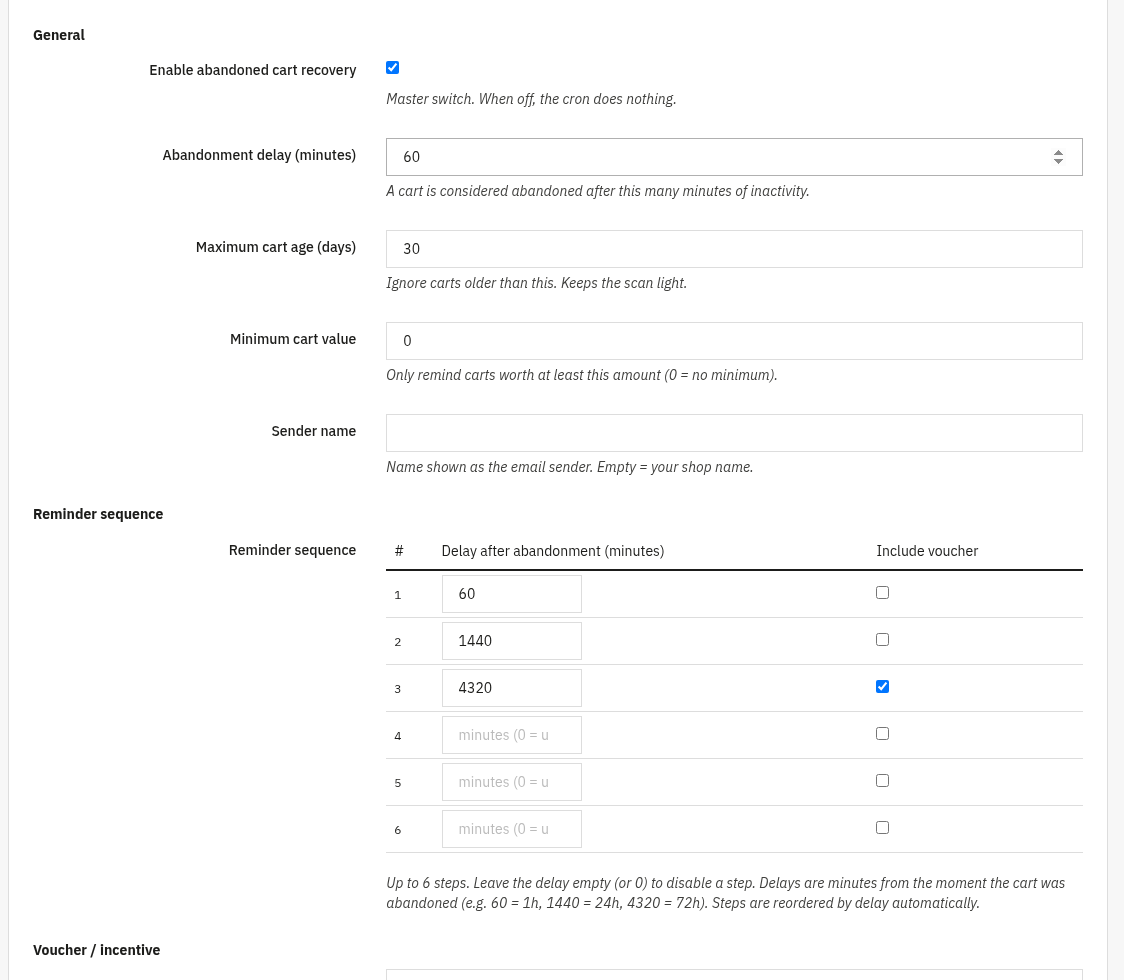
- General: Enable abandoned cart recovery (master switch; when off the cron does nothing), Abandonment delay (minutes) (a cart counts as abandoned after this much inactivity), Maximum cart age (days) (ignore older carts), Minimum cart value (0 = no minimum) and Sender name (empty = your shop name).
- Reminder sequence: up to 6 steps. For each step set a delay after abandonment in minutes (e.g. 60 = 1h, 1440 = 24h, 4320 = 72h; empty or 0 disables the step) and tick Include voucher to attach the incentive. Steps are reordered by delay automatically.
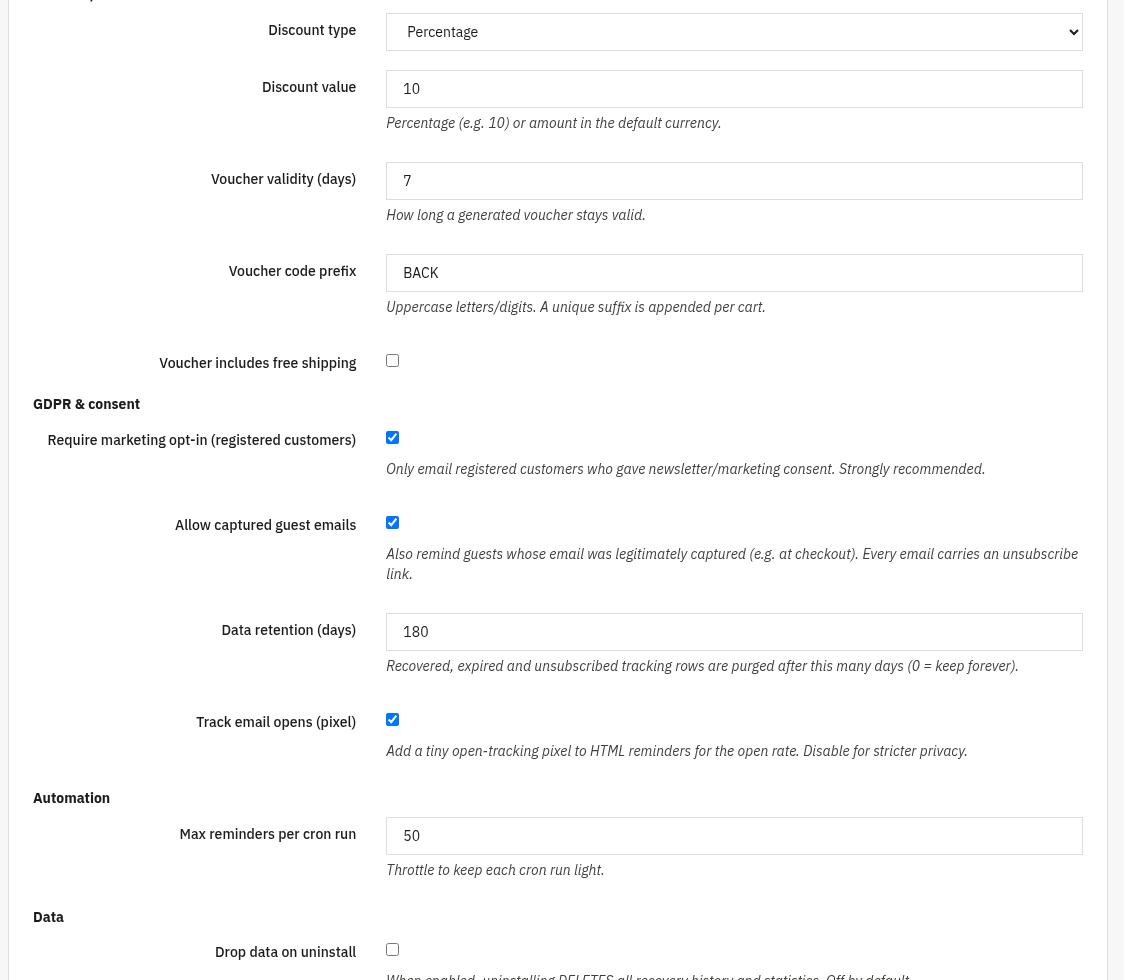
- Voucher / incentive: Discount type (Percentage or Fixed amount), Discount value, Voucher validity (days), Voucher code prefix (a unique suffix is added per cart) and Voucher includes free shipping.
- GDPR & consent: Require marketing opt-in (registered customers) (recommended), Allow captured guest emails (every email carries an unsubscribe link), Data retention (days) (purge closed tracking rows after N days; 0 = keep) and Track email opens (pixel) (powers the open rate; disable for stricter privacy).
- Automation: Max reminders per cron run to keep each run light.
- Data: Drop data on uninstall (off by default; when on, uninstalling deletes all recovery history and statistics).

Cron token required
The reminder sequence runs from a token-protected cron URL, not on page load. The Dashboard shows the exact URL to call; it looks like https://yourshop/index.php?fc=module&module=cll_abandonedcart&controller=cron&token=XXXX. A wrong or missing token returns 403 Forbidden, so the token keeps the endpoint private.
- Schedule it: point your server crontab or a web-cron service at that URL, e.g. every 15 minutes. Each run detects new abandoned carts, sends due reminders (up to the per-run limit), generates vouchers and purges old rows.
- Run now: the Dashboard has a manual Run now button to trigger one pass immediately for testing.
- Regenerate cron token: under Settings, the Cron token panel regenerates the secret if it ever leaks. After regenerating, update your scheduled task with the new URL.

3. Check that it works
- Open the cron URL shown on the Dashboard in a browser, it should return a small JSON summary (
"ok": true). A 403 means the token is wrong. - Click Run now on the Dashboard, then open the Abandoned carts list, a test cart left idle past the abandonment delay should appear there.
- Check the Dashboard KPIs (carts tracked, reminders sent, recovered, recovery rate) move as the cron processes carts.
- Complete a tracked cart into an order, its row should flip to recovered and the recovered revenue should update.
4. FAQ
Does it slow down my shop?
No. The work happens in the cron run, not on page load, and each run is throttled by the per-run reminder limit.
Will my customers be spammed?
No. You control the number of steps and their delays, every email carries an unsubscribe link, and a cart stops receiving reminders as soon as it becomes an order.
Is it GDPR-compliant?
It is GDPR-aware: you can require marketing opt-in, decide whether to include captured guest emails, set a data-retention window and disable open tracking.
Do I have to offer a voucher?
No. The voucher is optional and set per sequence step, you can run a reminder-only sequence with no incentive at all.